
White-Label Embedded Analytics: What It Is, Why It Impacts Revenue, and How to Make It Feel Native

.png)
Key Takeaways
- White-label analytics means shipping third-party dashboards under your brand; embedded means they live inside your product, and SaaS teams need both.
- 92% of industry respondents rate embedded BI as critical or very important, the highest reading since 2018 (Dresner Advisory Services, 2024).
- Logo swaps aren't native: the surface, interaction, and trust layers all have to match your product before users stop noticing the seam.
- Native-feeling analytics is a retention and packaging lever: per-tenant capability toggles map dashboards straight to your pricing tiers.
- Over 50% of organizations already run AI queries in analytics (Gartner, 2025); a white-labeled AI's mistakes ship under your brand, so demand semantic-layer grounding.
Here's a simple test. Show your product to someone unfamiliar with it. Ask them: "Which part looks embedded?"
If they point to the dashboards instantly, you have a problem.
Your customers don't want "access to reports". They expect analytics built into your product. Not a redirect. Not a separate login. Not a BI portal wearing your logo. Built in.
White-labeling is one of the most scalable and practical ways to ship analytics. When implemented deeply, it lets you deliver enterprise-grade reporting without building a second product from scratch. The challenge isn't white-labeling itself, it's stopping at surface-level branding instead of making analytics feel truly native. When execution falls short, users notice. Enterprise buyers notice. And the pattern shows up in usage first: people quietly stop opening dashboards that feel like someone else's product.
This article breaks down what white-label analytics actually means, why basic branding falls short, and exactly how to make analytics feel truly native, the kind where users never think "oh, this is the analytics tool" because it just feels like another screen in your product.
For a broader foundation (multi-tenancy, governance, and embedding models), see the embedded analytics guide.
What Is White-Label Embedded Analytics?
White-label embedded analytics means integrating a third-party analytics engine into your product and presenting it as your own. Your users see dashboards, charts, and reports inside your app, not inside a separate BI tool.
Under the hood, you rely on:
- A hosted query engine
- A charting and dashboard framework
- Permissions and row-level security
- Multi-tenant isolation
- Exporting and scheduling infrastructure
On the surface, it looks like your product built it all.
In practice, this usually involves:
- Embedding dashboards via SDK or iframe
- Applying your logo, colors, and typography
- Connecting authentication so users don't log in twice
Done right, you ship analytics in weeks instead of quarters. Done wrong, it looks like you pasted a reporting tool into your UI.
White-Label Analytics vs White-Label Embedded Analytics: What's the Difference?
The two terms get used interchangeably, but there's a useful distinction.
White-label analytics (you'll also see it called BI white labeling) is the broad practice: licensing third-party analytics software (dashboards, data visualization, reporting) and presenting it under your own brand, your logo, your colors, your domain, with the original vendor invisible to your users. Agencies white-label reporting tools for clients. Data providers white-label dashboards for investors. SaaS companies white-label BI for their customers.
White-label embedded analytics is the version that matters for SaaS products: the white-labeled experience doesn't just carry your brand, it lives inside your application. Same login, same navigation, same design system. Your users never leave your product to see their data.
The distinction matters because the failure modes are different. A white-labeled but non-embedded setup still breaks workflow continuity: separate URL, separate session, insight separated from action. Embedding solves that, but raises the bar, because now your analytics sits next to your own UI, where every mismatched border radius and off-brand chart palette is visible in direct comparison.
If you're shipping analytics to customers inside a SaaS product, white-label embedded analytics is the standard to hold vendors to. The rest of this guide treats "native-feeling" as the goal, not just "rebranded".
Why Do SaaS Products Buy White-Label Analytics Instead of Building It?
Because the expectation is now universal and the build is brutal. In the most recent Dresner Advisory data available, 73 percent of users and 92 percent of industry respondents rated embedded BI as critical or very important, the highest reading since 2018 and well above the prior year's 61 percent (Dresner Advisory Services, 2024). Buyers assume analytics ships inside the product.
Building it from scratch sounds appealing until you list what it actually requires. At minimum, you're signing up for data modeling for evolving datasets, performance optimization at scale, role-based permissions and row-level security, dashboard builders and flexible visualization layers, scheduling and exports, multi-tenant data isolation, and UX that doesn't feel clunky.
That's not a side feature. That's the second product. The dashboard is the easy part. Multi-tenancy, row-level security, per-tenant configuration, caching at scale, SSO integration, AI queries, ongoing maintenance - that's where the real time goes. If you're the one making the build-vs-buy case internally, put that list in front of engineering and ask what falls off the roadmap to build it.
White-label embedded analytics lets you ship faster, reduce engineering lift, match enterprise expectations, and focus on core workflows instead of BI infrastructure. Across DataBrain's published case studies, teams went live in 1 to 4 weeks; Freightify replaced Metabase and shipped a fully custom analytics module in one week. Want a specific number for your situation? Run the embedded analytics cost calculator to compare building in-house vs buying, or read the build vs buy guide for the full engineering breakdown.
This plays out vertical by vertical. Fintech and lending platforms, for example, face the same pattern with higher compliance stakes: see how it works in financial services analytics.
The Real Problem: Cosmetic White-Labeling Isn't Enough
Most teams get this wrong the same way. They equate white-labeling with branding.
That usually means uploading a logo, picking a primary color, and setting a font. That's not native integration. That's surface paint.
When most vendors say "white label," they deliver branding, not a native experience. True white-label analytics goes beyond logos and colors. We've found the same tells show up again and again:
- Charts use generic blues and grays instead of your brand palette
- Card borders and shadows don't match your product components
- Analytics buttons and menus behave differently from the rest of your UI
- System copy says "Token invalid" instead of speaking in your tone
- Filters show odd presets like "Yesterday" when your teams care about "This quarter"
iFrame-based embeds compound the problem. They create visual seams between your application and the analytics layer. Subtle differences in scrolling behavior, typography rendering, and interactive patterns break the immersion. Users feel like they've stepped into a different product, even if they can't articulate why.
Common Challenges With White-Label Analytics (What to Check Before You Buy)
The gap between "white-label" on a vendor's pricing page and an actually native experience usually shows up in one of these places. Use them as a due-diligence list.
Technical challenges
- iFrame-only embedding. iFrames restrict styling, hurt mobile responsiveness, and add load time. If the vendor's only embed path is an iFrame, a truly native experience is off the table. Prefer SDKs or web components that render in your application's DOM, and check mobile first: that's where iFrame seams show up soonest.
- Tools that weren't designed for embedding. Most traditional BI tools were built for internal analysts and retrofitted for embedding. The retrofit shows: clunky auth handoffs, no per-tenant configuration, and multi-tenant support bolted on rather than designed in.
- Stack compatibility. A solution that doesn't align with your existing stack or database schema turns a weeks-long integration into a quarter of glue work. Verify warehouse support and framework SDKs before anything else.
Customization and branding challenges
- Superficial customization. Logo swapping and preset themes are table stakes. If you can't control chart palettes, card styling, typography, and system copy, or if that control costs extra, your analytics will always read as third-party.
- Generic user experience. When every customer of the vendor gets the same layouts and interaction patterns, your analytics looks like everyone else's. Look for component-level control and programmatic overrides.
Security and control challenges
- Multi-tenant isolation. Without tenant-aware tokens, granular role-based access control, and row-level security, a multi-tenant analytics setup is a compliance incident waiting to happen. Ask where isolation is enforced: at the data and query layer, or only in the UI. UI-layer "isolation" is the first thing enterprise procurement will pull apart, and tenant-aware tokens should be the default, not an enterprise add-on.
- Vendor dependency. You're relying on the vendor for updates, uptime, and roadmap. Ask what happens when they ship a platform update: does your themed, customized experience survive it, or do releases break your overrides? Evaluate release cadence and support responsiveness the same way you'd evaluate the feature list.
Operational challenges
- Scale behavior. A solution that performs well in the demo can degrade under real customer load. Ask how query performance, caching, and concurrency behave at 10x your current usage.
- Deployment and data residency. If you sell into regulated industries, confirm where queries run and where data lives. A platform that queries your warehouse directly and stores only metadata is a very different compliance conversation than one that copies your customers' data into its own cloud.
- Licensing constraints. Per-user or usage-based pricing scales up with your customer growth, which is exactly the wrong direction for customer-facing analytics. Flat, feature-based pricing keeps the unit economics predictable. Ask for the price at 3x and 10x your current tenant count before you sign anything.
None of these are reasons to build in-house instead. They're the difference between vendors, and the rest of this guide is effectively the deep version of this checklist.
The 3 Layers of Native Embedded Analytics
If you want analytics to feel like it belongs, you need alignment across three layers. In our experience evaluating and replacing embedded BI setups, nearly every "it looks bolted on" complaint traces back to exactly one of these.
.png)
Layer 1: Surface Layer (Visual Alignment)
Do your dashboards match your design system? This means typography, spacing, border radius, card shadows, layout grids, and chart color palettes all need to align.
If your product uses soft neutrals and rounded cards, but your dashboards use generic blues and sharp corners, the illusion breaks instantly. Visual mismatch signals: "This was added later."
Instead of treating themes as a superficial skin, deep white-labeling lets you align analytics views with your design system at the component level. Card styling matters more than most teams realize. When metric tiles use different padding, corner radius, or shadow depths than your native cards, the visual inconsistency registers subconsciously.
Layer 2: Interaction Layer (Behavior & Permissions)
Does analytics behave like the rest of your product? Do filters match your business logic? Are date presets aligned with billing cycles or fiscal quarters? Do roles and permissions mirror your app's access model? Do interactions follow the same UX patterns?
If your app talks in "billing cycles" but dashboards default to "Yesterday," you've created cognitive friction. Behavioral mismatch is where adoption quietly drops.
Consider a typical SaaS with multiple customer segments. You might want read-only dashboards for end customers with no metric creation or layout customization. Sales teams might get layout editing and custom metric creation. Product teams could unlock scheduled email reports and underlying data access. If your analytics embed shows the same capabilities to everyone, you're either overwhelming entry-level users or hiding value from users who've paid for advanced features.
Layer 3: Trust Layer (Security & Isolation)
This is where enterprise buyers pay attention.
White-label embedded analytics in SaaS must support:
- Domain whitelisting: embeds only render on approved domains
- IP whitelisting: database traffic only from known IP ranges
- Tenant-aware tokens: users only see their own data
- Row-level security: granular control over which rows each user can access
- HTTPS everywhere
If your embed model can't handle secure isolation between customers, it won't survive procurement review. Native isn't just visual. It's operationally invisible.
Where Does AI Fit in White-Label Analytics?
In 2026, an embedded analytics evaluation that ignores AI is incomplete. A Gartner survey of 403 analytics and AI leaders found over 50% of organizations already use AI tools for automated insights and natural language queries, and Gartner predicts 75% of new analytics content will be contextualized through generative AI by 2027 (Gartner, 2025).
For white-labeling, that raises two questions most checklists miss.
First, can the AI experience itself be white-labeled? If your users can ask questions in plain language, the input box, the response formatting, and the error copy all belong to the same native standard as your charts. An AI assistant that answers in a different tone, or under a different name, breaks the illusion faster than any mismatched border radius.
Second, what grounds the answers? Natural language query is only as trustworthy as the semantic layer underneath it. When metric definitions, joins, and permissions live in a governed semantic layer, every AI answer is traceable to a defined metric and scoped by the same row-level security as the dashboards. Without that grounding, you're embedding a hallucination risk into your own product, under your own brand. That last part is the point: when the AI is white-labeled, its mistakes are yours.
Why Native-Feeling Analytics Impacts Revenue
Watch what users actually do in the quarter after analytics ships. When it feels bolted on, dashboard sessions taper off, self-serve exploration never takes hold, report requests keep arriving as support tickets, and your champion walks into the renewal conversation with nothing to point at. Shipped but unadopted is a failure state, and it's the default outcome for embeds that stop at branding.
The upside runs just as direct. Spotdraft's product team saw it after embedding: "We now offer our customers extensive insights out of the box, sparing them the pain of creating their own metrics," as Jaskaran B, the PM on that rollout, put it. Every report a customer builds themselves is a support ticket that never gets filed.
For many companies, analytics justifies higher pricing tiers, drives upsell conversations, and supports expansion into enterprise accounts. A strong embedded analytics experience says: "We are a mature platform." Shallow integrations say: "We integrated something." That difference shows up in expansion revenue.
Why Not Just Send Users to a Separate BI Tool?
Because context matters.
Sending customers to a separate BI portal breaks workflow continuity, forces additional authentication, reduces product stickiness, and separates insight from action. Every extra hop costs adoption: a separate portal means a separate session, a separate mental model, and one more login that busy users will eventually stop bothering with.
When analytics lives inside your product, users can analyze, decide, and act without leaving your environment. That's the difference between reporting and embedded intelligence.
How to Make White-Label Embedded Analytics Feel Native Using Databrain
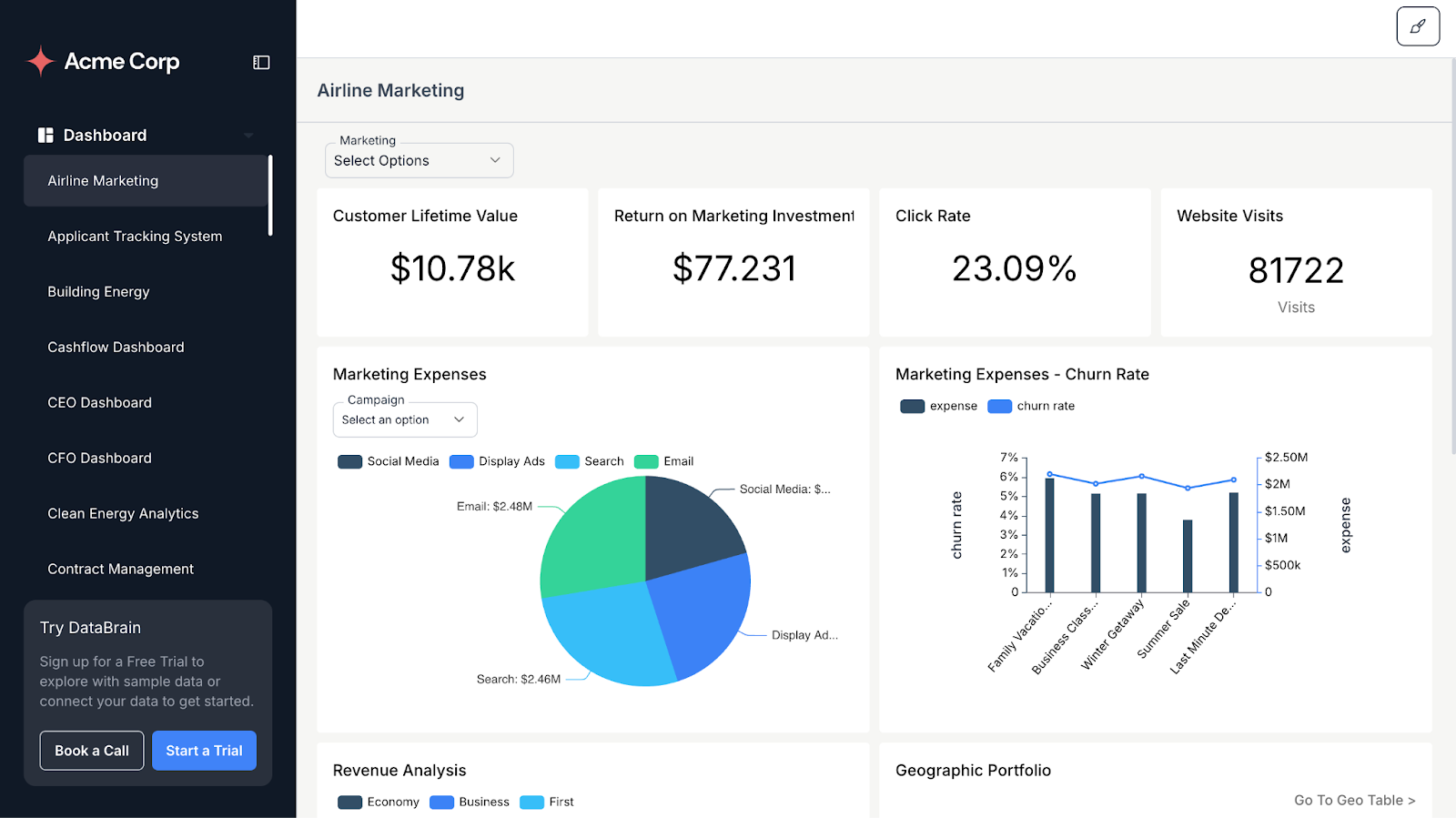
DataBrain is built for teams that want analytics to disappear into the product and not stand out as a separate tool. You get fine-grained control over three big pillars:
- Visual Theming and Layout
- UX and Interaction Customization
- Localized Copy, Messages, and Empty States
All of this can be configured per embedded dashboard or even per metric, so you can tune the experience to each surface inside your app.
Visual Theming That Mirrors Your Design System
If your product already uses a dark navy background with teal CTAs and slightly rounded cards with soft shadows, you shouldn't be manually recreating that in a separate analytics designer.
DataBrain lets you apply theme names and admin theme options directly from your existing UI theming panel, so dashboards automatically inherit the same background, CTA colors, and card styles your product already uses.
Then go granular. Card styling matters more than most teams realize. When metric tiles use different padding, corner radius, or shadow depths than your native cards, the visual inconsistency registers subconsciously. DataBrain lets you adjust card padding, radius, and shadows to make metric tiles visually indistinguishable from your own components. If your product uses a flat, minimalist aesthetic, you should be able to hide chrome elements like metric card borders, card shadows, dashboard names, loaders, and full-screen buttons entirely.
Charts are often where embedded analytics expose their origins. Default palettes, clashing fonts, and generic legends all scream "third-party tool". (For a deeper look at how charts and visualizations behave inside a host product, see the embedded data visualization guide.)
DataBrain supports deep theming, which means controlling custom chart color palettes via dedicated configuration (like chartColors) so lines, bars, and areas use your brand colors. It means configuring chart appearance details: tooltip typography, label positions, margins, legend position and orientation, axis fonts and colors. When your revenue trend chart looks like a visualization your design team created, you're reinforcing brand trust with every interaction.
Controlling UX and Interactions Per Tenant
A native analytics experience isn't just about appearance, it's equally about what users can do and how much complexity they see.
The solution is granular control over dashboard actions and editing affordances. You should be able to independently toggle capabilities like creating, updating, or deleting metrics, customizing dashboard layout, managing metrics, scheduling email reports, and viewing underlying data.
Each toggle lets you map analytics capabilities to your pricing structure precisely, turning analytics into a packaging and upsell lever while keeping the UX focused for users who just need answers.
Small interaction details matter too. Consider the options menu icon, the same three-dot pattern that appears throughout modern interfaces. If your product uses that pattern, your analytics should too. The result is a UX that feels like a continuation of your existing product patterns, not a switch into a separate tool.
Scheduled Reports from Your Custom Domain
Native analytics doesn't stop inside your application. It extends to how insights are delivered outside of it.
Scheduled reports are a critical part of enterprise workflows. Finance teams, executives, and operators rely on automated dashboards delivered via email. If those emails come from a third-party domain or redirect users to an external analytics portal, the embedded experience immediately breaks.
With DataBrain, scheduled reports can be sent directly from your custom domain, ensuring complete brand continuity.
When users share or schedule reports:
- Emails are sent from your configured domain
- Links resolve within your application URL
- The experience feels fully native, not vendor-powered
- Tenant-aware access and role permissions remain enforced
This ensures analytics feel embedded everywhere, including the inbox. See how to set up scheduled report emails from your own domain.
Localized Copy, Messages, and Empty States
Even beautifully themed analytics can break immersion if the language feels off.
System messages create some of the most jarring disconnects. A generic token expiry message like "JWT expired" sounds like a developer error, not a user-facing message. Compare that to "Your analytics session has ended, refresh to continue."
Custom messages for token expiry, missing tokens, and permission issues let you align with the tone of voice users expect from your product.
Internationalization goes beyond translating interface labels. Metric names need localization too. A translation dictionary that maps your terminology into supported languages combined with a language prop for per-tenant or per-user localization ensures dashboards show up in the correct language automatically.
Empty states reveal whether embedded analytics truly integrates with your brand. When a chart has no data, generic platforms show a blank grid or a standard "No data found" message.
DataBrain shows your custom illustration via SVG configuration the same style your product uses for empty inbox states or no-results search pages. Friendly copy like "No data yet. Try expanding your date range or adjusting filters" keeps the experience consistent in moments where users most need guidance.
Date and filter presets demonstrate sophisticated localization. If your product operates on quarterly business reviews, the default date range should be "This Quarter," not "Last 7 Days." If your business never analyzes daily data, remove "Yesterday" from date picker options entirely.
Is White-Label Embedded Analytics Secure for Multi-Tenant SaaS?
Yes, if implemented correctly.
Embedded analytics platforms support token-based user scoping, strict tenant isolation, row-level security, and infrastructure-grade encryption. The strongest setups enforce tenancy at the data and query layer, not just in the interface, so a themed front-end never becomes the only thing standing between two customers' data.
Domain whitelisting ensures dashboards only render on the domains you explicitly trust, your production app and necessary staging environments for QA. Avoid wildcard configurations that allow any domain, as they expose your analytics to unauthorized embedding.
Combined with IP whitelisting for database connectivity and tenant-aware token integration, this reduces risk even if a token is exposed. The dashboard simply won't render on unauthorized hosts, adding a layer of protection beyond token validation alone.
Authentication is part of the same story: wiring secure SSO and OAuth into embedded dashboards keeps the login experience native while keeping tokens short-lived and scoped. For the full picture of certifications and architecture, see DataBrain's security and compliance overview.
Implementation Blueprint: From Generic Embedded BI to Native Analytics
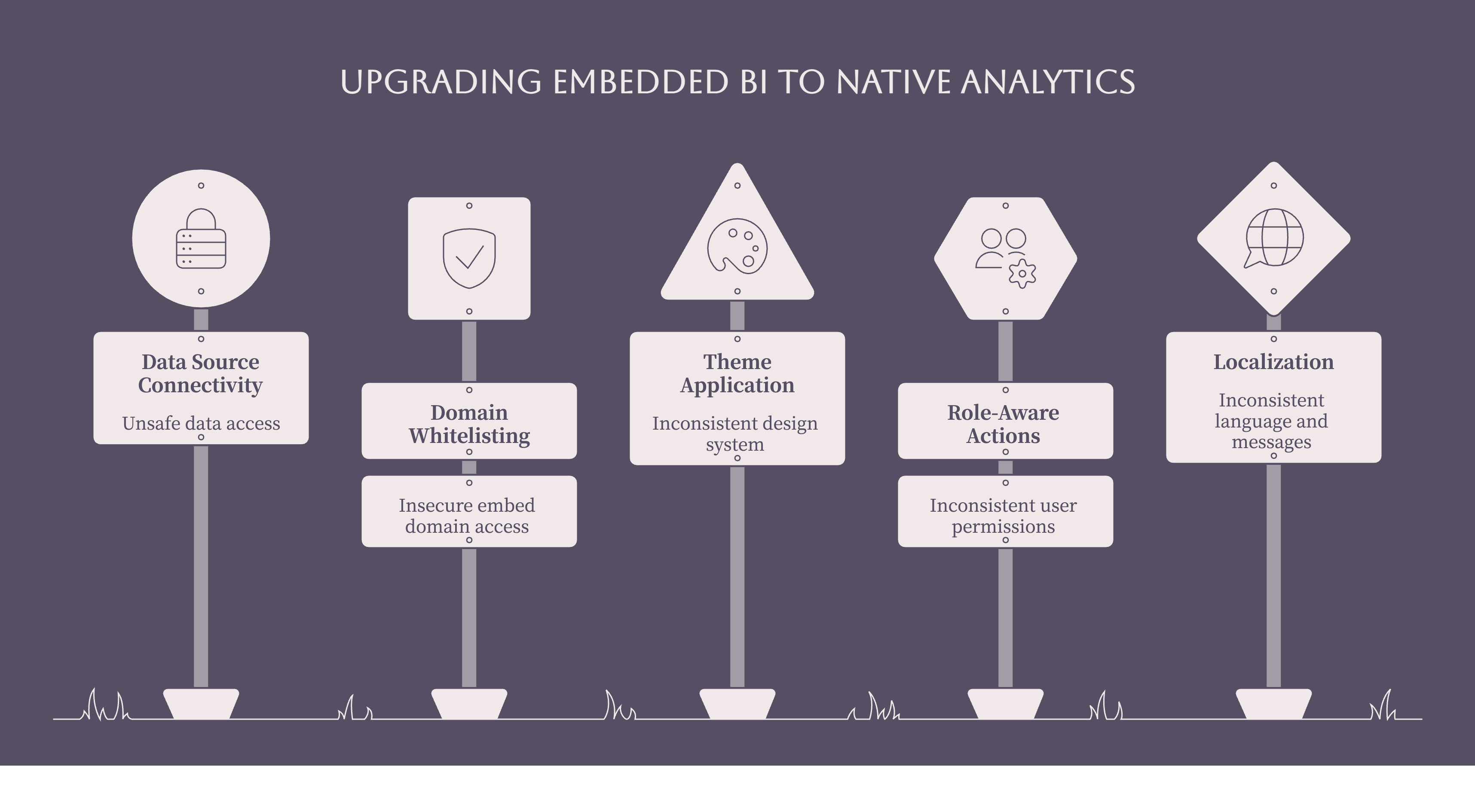
If you're running a SaaS product and currently embedding dashboards that feel "just okay", use this practical blueprint to upgrade that experience.
Step 1: Connect Data Sources Safely
Configure database connectivity using IP whitelisting, so your data warehouse only accepts traffic from known IP ranges. Validate this in your lower environments first, then mirror the setup in production.
Step 2: Configure Domain Whitelisting and Tokens
Define your allowed embed domains such as production app domains and necessary staging/preview domains for QA. Avoid wildcard * that allows any domain. Ensure HTTPS is enforced in production. Integrate your guest or auth tokens so dashboards only render in your intended host app.
Step 3: Apply Themes, Chart Palettes, and Chrome Settings
Map your existing design system tokens (colors, typography, spacing) into your analytics theme. Configure card padding, radius, shadows, dashboard background and CTA colors, chart color palettes and legend/axis styles.
Hide visual chrome like card borders, shadows, dashboard names, loaders, and full-screen buttons wherever you want analytics to "disappear" into the page.
Step 4: Set Up Role-Aware Actions and Filters
Define which actions are visible for each role like read-only vs editable dashboards, ability to create/update metrics, layout customization, email scheduling and underlying data access.
Configure global and metric-specific filter presets so each embedded view opens with meaningful defaults and uses date ranges and labels that match your product's mental model.
Step 5: Localize Copy, Messages, and Empty States Before Launch
Integrate your translation dictionary for key terms and metric labels. Customize token expiry and access messages plus generic system messages that appear within analytics.
Configure "no data" illustrations and copy that match your brand's empty-state patterns. Test across languages and regions, including calendar-type behavior, so analytics feels native to every audience you support.
Native UX Checklist for Evaluating White-Label Analytics
If you're comparing vendors or modernizing an existing embedded BI stack, use this checklist to assess how "native" their experience can really be. (For a side-by-side look at the platforms themselves, see the embedded analytics tools comparison, or a direct matchup like DataBrain vs Tableau if you're weighing a traditional BI tool for the job.)
.png)
Visual depth:
- Can you control card padding, radius, shadows, and background per dashboard?
- Can you hide chrome like borders, titles, loaders, and full-screen buttons for a flat, native look?
- Can charts reuse your brand palettes and typography across legends, axes, and tooltips?
Interaction control:
- Can you selectively expose actions like create metric, edit layout, schedule emails, and view underlying data per role?
- Can you align options menus and interaction patterns with your app's existing conventions?
Localization and language:
- Can you customize all system messages like token expiry, access errors, generic errors to match your tone?
- Can you localize metric labels and analytics copy per tenant or per user via a translation dictionary?
Filters and regional behavior:
- Can you predefine filter presets and default date ranges that reflect your business concepts?
- Can you hide unused date options and adapt calendar behavior for specific regions?
Security and embedding:
- Can you whitelist only specific domains where dashboards render?
- Does analytics stay protected if a valid token is exposed outside those domains?
AI:
- Can natural language queries be themed and branded like the rest of the experience?
- Are AI answers grounded in a governed semantic layer and scoped by the same row-level security?
If a platform can't check these boxes, you'll end up with something that looks "sort of" like your app but never truly feels native.
The Bottom Line
White-label analytics is a powerful strategy but it should mean more than just swapping logos. It should mean analytics that your users believe you built yourself because every detail, from card shadows to calendar types, tells them exactly that.
Shipping analytics is easy. Making it feel like it belongs? That's where real product maturity shows up.
Your users may not know the term white-label analytics. But they know when they've left your product. The goal is to make sure they never feel that way.
DataBrain is designed to meet these criteria out of the box; explore the full configuration options to see how granular the control goes. You can also browse a few sample dashboards created and embedded using DataBrain.
Ready to run the reality test?
Show your product to someone unfamiliar with it. Ask which part looks embedded. Then schedule a demo with DataBrain to see how your analytics could score and what it would take to make your dashboards disappear into your product completely.
Explore the documentation, or contact the team with your tenancy model and stack; that conversation is usually the fastest way to scope the work.
Ready to run the reality test?
Show your product to someone unfamiliar with it. Ask which part looks embedded. Then schedule a demo with Databrain to see how your analytics could score and what it would take to make your dashboards disappear into your product completely.
Frequently Asked Questions
What is white-label analytics?
White-label analytics (sometimes called BI white labeling) is licensing third-party analytics software, dashboards, reporting, and data visualization, and presenting it under your own brand. Your users see your logo, colors, and domain; the vendor stays invisible. When those dashboards also live inside your application, that's white-label embedded analytics.
How do I implement white-label analytics in my product?
Connect your data source, embed dashboards through an SDK or web component, wire authentication into your existing login, then apply your theme. In our experience, the sequence that works: data connection and IP whitelisting first, then domain whitelisting and tokens, then theming, roles, and localized copy. Most teams go live in weeks, not quarters.
How do I theme and white-label embedded charts?
Map your design system tokens (colors, typography, spacing) into the analytics theme, then configure chart palettes, legend and axis styles, tooltips, and card styling. DataBrain exposes all of this through theme options and per-metric configuration, so charts inherit your brand palette instead of a generic default.
Can white-label dashboards be localized into multiple languages?
Yes. Look for a translation dictionary that maps your terminology, plus a language setting for per-tenant or per-user localization. Metric names, filters, system messages, and empty states should all localize, not just interface labels. Dashboards then render in each user's language automatically, with no separate build per region.
Can I enforce row-level security in a white-labeled multi-tenant app?
Yes, and you should. Tenant-aware tokens scope every query to the requesting customer, and row-level security controls which rows each user sees inside that tenant. Prefer platforms that enforce this at the data and query layer rather than the UI, and that support code-first configuration you can version and review.


