

.png)
Enterprise SaaS applications demand vendor abstraction and security-first architecture. Exposing third-party analytics tokens in browser code creates security audit flags and violates enterprise architectural standards.
Today, we're launching Proxy Authentication Mode for DataBrain, enabling you to embed analytics without exposing any DataBrain tokens in your frontend. Route all analytics API calls through your own backend infrastructure with complete control over authentication, monitoring, and compliance.
Related: Self-Hosted Embedded Analytics
Why Proxy Authentication for Embedded Analytics
Enterprise Security
Zero-Trust Architecture: No third-party tokens in browser code. All authentication flows through your backend.
Vendor Abstraction: DataBrain becomes invisible. Security scanners never see DataBrain tokens in your client-side code.
Compliance: Meet SOC 2, ISO 27001, and custom enterprise security standards that prohibit direct third-party API calls from frontend.
Operational Control
Centralized Monitoring: All analytics requests flow through your infrastructure and appear in your observability stack (Datadog, New Relic, CloudWatch).
Rate Limiting: Apply your own rate limits using the same infrastructure you use for your core API.
Audit Trails: Log every analytics request with user context for compliance.
The Problem
Traditional approach: Frontend → DataBrain API (guest token visible in browser)
Issues: Tokens visible in DevTools, security audit flags, limited control over routing.

The Solution
New pattern: Frontend → Your Backend Proxy → DataBrain API
Benefits: Tokens never leave your backend, complete visibility in logs, vendor-agnostic architecture.
How Proxy Authentication Works
The Problem vs The Solution
Traditional embedded analytics expose vendor tokens in the browser, creating security audit flags. Proxy authentication solves this by routing all API calls through your backend.
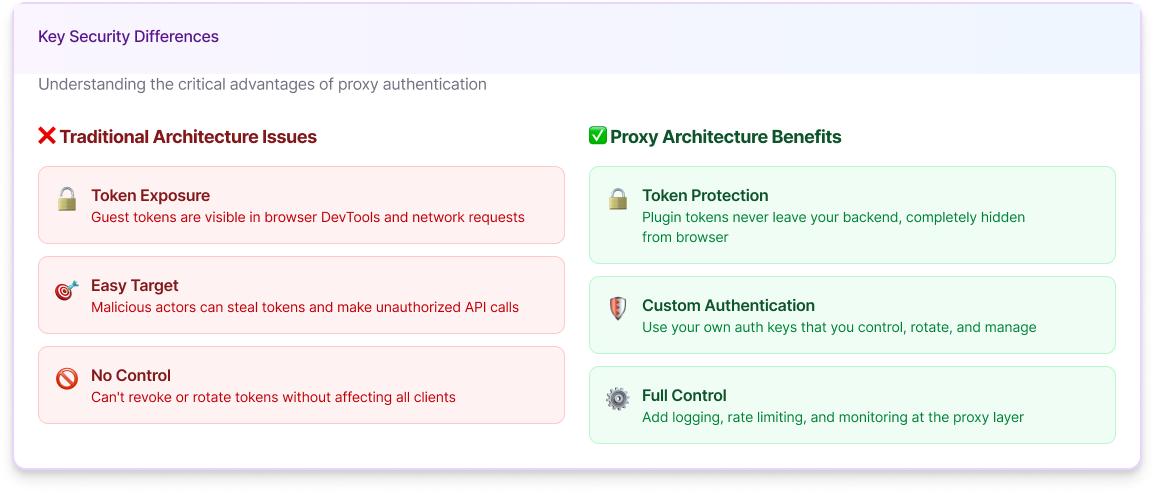
Traditional Architecture (Security Risk):
- Frontend directly calls DataBrain API with guest token
- Token visible in browser DevTools and network inspector
- Third-party API dependency visible to security scanners
- Fails enterprise security reviews
Proxy Architecture (Enterprise Secure):
- Frontend calls your backend proxy with your custom auth key
- Your proxy adds DataBrain token on the backend (never exposed)
- Token management happens entirely on your infrastructure
- Passes enterprise security reviews
The Request Flow
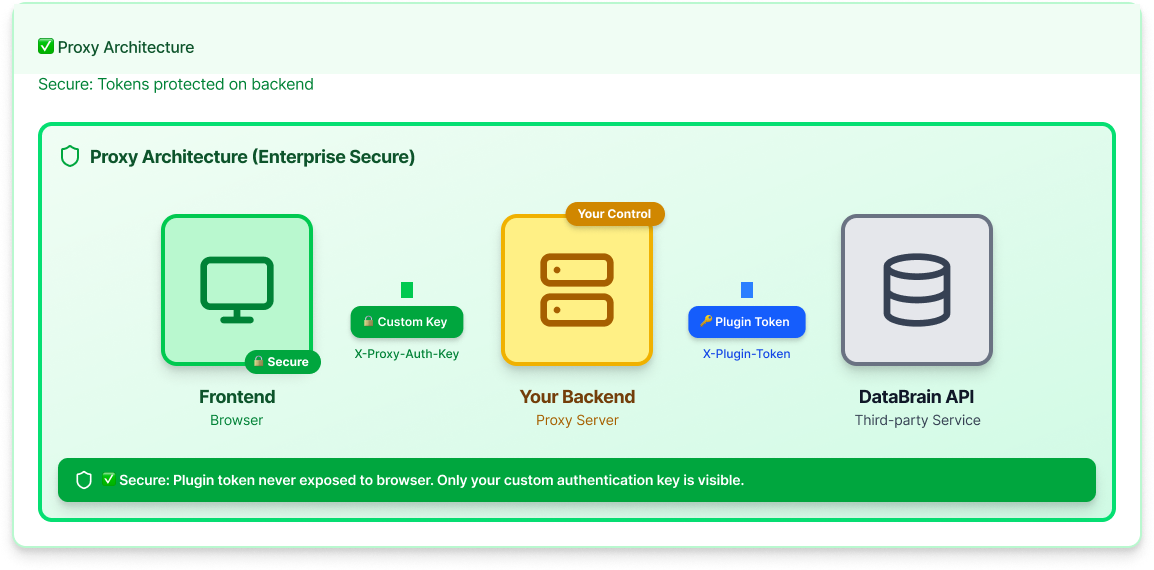
The Flow:
- Client Sends Request: Your frontend sends a request to your proxy server with your custom authentication header (X-Proxy-Auth-Key)
- Proxy Validates Request: Your proxy validates the authentication header. If invalid or missing, return an error response immediately.
- Proxy Forwards Request: Your proxy constructs the upstream URL, adds the X-Plugin-Token header, and forwards the request to DataBrain API exactly as received.
- Response Returned: Your proxy returns the DataBrain API response to the client exactly as received (status code, body, and headers).
Key Features
Pass-Through Architecture: Your proxy forwards requests without transformation. The request body, query parameters, and HTTP method remain unchanged. This ensures all DataBrain features work seamlessly.
All APIs Supported: Dashboards, metrics, filters, drill-downs, and all download endpoints (PDF, CSV, Excel) work through the proxy. No special cases or direct API calls needed.
Binary Support: The proxy correctly handles both JSON responses and binary file downloads. Content-type detection ensures PDFs, CSVs, and Excel files are preserved without corruption.
Zero Backend Changes: DataBrain API works identically—it receives the same requests it always has. Your proxy handles routing transparently.
Framework Agnostic: Build your proxy in any backend language or framework. Reference implementations provided for Node.js, Python (FastAPI/Flask), Go, Java, and .NET.
Implementation in 3 Steps
Step 1: Configure Frontend (2 minutes)
Before: Direct token authentication
After: Proxy authentication
Notice the token prop is removed entirely. Your frontend never handles DataBrain tokens.
React Component Example:
See full frontend configuration: Frontend Configuration Guide
Step 2: Build Your Proxy Server (10 minutes)
Your proxy can be built on any backend: Node.js, Express, FastAPI, Python, Go, Lambda, Cloudflare Worker, etc. It must receive requests from your frontend and forward them to DataBrain API with required headers added.
Python/FastAPI Example:
What This Proxy Does:
- Validates Authentication: Checks X-Proxy-Auth-Key header against your secret key stored in environment variables
- Forwards Requests: Constructs the upstream URL to DataBrain API and forwards the request with X-Plugin-Token header
- Handles Binary Data: Correctly processes both JSON responses and binary file downloads (PDF, CSV, Excel)
- Returns Responses: Forwards DataBrain's response back to the client exactly as received
See implementations in other languages: Node.js, Python (Flask), Java, Go, .NET
Step 3: Deploy and Test (5 minutes)
Deploy Your Proxy
Deploy to your existing infrastructure:
- AWS Lambda: Serverless proxy with API Gateway
- Google Cloud Run: Containerized proxy with automatic scaling
- Kubernetes: Deploy as a service alongside your application
- Traditional VMs: Run on your existing EC2, Compute Engine, or Azure VMs
- Cloudflare Workers: Edge-deployed proxy for global low latency
Environment Variables Required:
Test Your Implementation
curl https://your-api.com/databrain-proxy/health
- Verify proxy is accessible: Test with the curl command above
- Test with a dashboard: Load a DataBrain dashboard and verify it renders
- Check your logs: Confirm analytics requests appear in your application logs
- Test downloads: Verify PDF, CSV, and Excel downloads work through the proxy
Generate guest tokens: Use the Guest Token API to create tokens programmatically with user-specific permissions and Row-Level Security.
Total Setup Time: 15-20 minutes
Key Benefits for Enterprise Teams
Security & Compliance
Zero tokens in frontend: Pass SOC 2 and ISO 27001 security audits without explaining vendor token exposure. Your architecture review shows only your own API gateway.
Vendor abstraction: DataBrain invisible to security scanning tools, penetration tests, and code audits. Enterprise security teams never question third-party dependencies.
Custom authentication: Integrate with your existing auth infrastructure (OAuth2, SAML, custom JWT). No separate token management for analytics.
Complete audit trails: Log every analytics request with user context. Track who accessed which dashboards, when, and what data they viewed.
Operational Control
Centralized monitoring: Track analytics usage through your observability stack (Datadog, New Relic, Splunk, CloudWatch). See analytics alongside your core application metrics.
Rate limiting: Apply your rate limits to prevent abuse. Use the same rate limiting infrastructure you use for your core API—no separate configuration needed.
Custom routing: A/B test analytics backends, implement gradual rollouts, or route requests based on tenant, region, or feature flags.
Request transformation: Add custom headers, modify requests, implement tenant-specific routing, or inject additional context as needed.
Enterprise Procurement
Faster security reviews: No third-party tokens in client code means fewer questions during security reviews. Your architecture fits standard enterprise patterns.
Architectural alignment: Fits standard enterprise proxy patterns. Your infrastructure team understands and approves this approach immediately.
Vendor independence: Switch analytics backends without frontend changes. DataBrain is a pluggable backend service, not a frontend dependency.
Compliance simplification: Your backend controls all external API calls. Compliance teams see a clean architecture that matches their requirements.
Real-World Use Cases
Enterprise B2B SaaS Platform
Challenge: Security team blocked embedded analytics due to third-party token exposure in browser. Six-week security review process stalled product launch.
Solution: Implemented DataBrain Proxy Authentication with existing API gateway infrastructure. All analytics requests now route through the same gateway as core application APIs.
Results:
- Passed security review in 2 weeks
- All analytics requests logged in Datadog with user context and session IDs
- Applied existing rate limiting policies to analytics endpoints
- Reduced vendor lock-in concerns during enterprise customer procurement
- Security team approved without escalation
Financial Services Platform
Challenge: SOC 2 Type II audit flagged direct third-party API calls from frontend as a compliance risk. Auditors required all external API calls to be proxied through backend infrastructure.
Solution: Proxy authentication with request logging and audit trails. Every analytics request now appears in the same audit log system as financial transactions.
Results:
- 100% of analytics requests logged for compliance with user ID, timestamp, and request details
- Passed SOC 2 audit on first attempt with zero findings
- Integrated analytics monitoring into existing observability stack
- Custom rate limiting based on customer tier (bronze/silver/gold SLA tiers)
- Audit trail meets regulatory requirements for financial services
Technical Capabilities
What Works Through the Proxy
All DataBrain features work seamlessly through proxy authentication:
Dashboard Rendering: Full interactive dashboards with filters, drill-downs, and dynamic data refresh
Metric Charts: All 50+ chart types including line, bar, pie, scatter, heatmaps, funnels, cohorts
Filters & Drill-downs: Dynamic filtering and data exploration without page reloads
PDF Downloads: Dashboard and metric exports as PDF files
CSV Downloads: Data exports as CSV files
Excel Downloads: Bulk data exports as Excel (.xlsx) files
Real-time Updates: Live dashboard refresh with WebSocket fallback to polling
Custom SQL: Ad-hoc query execution through DataBrain's query builder
Binary File Support
The proxy correctly handles both JSON responses and binary file downloads without modification. Our reference implementations use proper content-type detection to ensure binary data is preserved:
- PDF exports: Dashboard snapshots and metric reports
- CSV exports: Raw data downloads for analysis
- Excel exports: Multi-sheet workbooks with formatting preserved
The key is to forward the response as-is, respecting the Content-Type header from DataBrain API.
Scaling Considerations
Caching: Cache guest tokens on your backend to avoid repeated token generation API calls. A typical pattern:
Horizontal Scaling: Your proxy scales independently of DataBrain infrastructure. Add more proxy instances behind your load balancer as needed.
Load Balancing: Standard load balancing applies to your proxy layer. Use your existing load balancer (ALB, nginx, HAProxy) to distribute traffic across proxy instances.
Security Best Practices
Authentication Keys
Use cryptographically random keys with minimum 32 characters. Generate with:
Rotate keys periodically (every 90 days recommended). Store keys securely in environment variables or secret managers: AWS Secrets Manager, Google Secret Manager, HashiCorp Vault, or Azure Key Vault. Never commit keys to source control.
HTTPS Only
Enforce HTTPS for all proxy endpoints. Never allow HTTP in production. Use TLS 1.2 or higher. Disable older protocols in your load balancer or reverse proxy configuration.
Rate Limiting & Monitoring
Apply rate limits per user/tenant to prevent abuse. Implement exponential backoff for failures. Monitor for abuse patterns: sudden spike in requests from single IP, repeated authentication failures, or unusual request patterns (high volume of downloads).
Log all proxy requests with user context for audit trails. Monitor for authentication failures. Set up alerts for unusual traffic patterns. Retain logs according to compliance requirements (SOC 2: 12 months minimum, GDPR: according to your data retention policy, HIPAA: 6 years minimum).
Comparison with Other Embedded Analytics
Next Steps: Get Started Today
Option 1: Quick Start (15-20 minutes)
- Choose your proxy implementation language from Proxy Authentication API Reference
- Configure environment variables: PROXY_AUTH_KEY, SELFHOSTED_BACKEND_URL, GUEST_TOKEN
- Deploy to your infrastructure (AWS Lambda, Cloud Run, Kubernetes, etc.)
- Update frontend configuration with window.dbn settings
- Test with your dashboards and verify all features work
Option 2: Talk to Our Team
Schedule a consultation to discuss your security requirements, get guidance on proxy architecture for your specific use case, review compliance requirements (SOC 2, HIPAA, GDPR), design optimal multi-tenant authentication flow, and plan migration from direct token authentication.
Option 3: Explore Documentation
Comprehensive guides and API references:
- Proxy Authentication API Reference - Complete implementation details
- Guest Token API Documentation - Token generation and Row-Level Security configuration
- Frontend Configuration Guide - Framework-specific examples
- Self-Hosted Deployment Options - Architecture for on-premise deployments
Start Using Proxy Authentication Today
Embed analytics without exposing vendor tokens
Pass security audits with vendor abstraction
Maintain control with centralized monitoring
Try DataBrain Free | View Documentation | Talk to Our Team
About DataBrain
DataBrain is an embedded analytics platform built for modern SaaS applications. We help product teams ship customer-facing analytics in days, not months, with enterprise-grade security, multi-tenancy, and self-service capabilities.
Learn more:
Frequently Asked Questions
Do I have to use Proxy Authentication?
No. Proxy authentication is opt-in. Direct token authentication continues to work identically. Choose proxy authentication when you need vendor abstraction, centralized monitoring, custom auth patterns, or zero tokens in frontend code.
Does this work with self-hosted DataBrain?
Yes. Point your proxy to your self-hosted DataBrain backend URL in the SELFHOSTED_BACKEND_URL environment variable. Everything else works identically.
What languages can I build the proxy in?
Any backend language. DataBrain provides reference implementations in Node.js/Express, Python (FastAPI and Flask), Go, Java/Spring Boot, and .NET.
Can I modify requests before forwarding?
Yes. You have complete control over request transformation: add custom headers, modify request bodies, apply tenant-specific routing, and implement custom rate limiting. For standard use cases, forwarding requests unchanged is recommended.
How do I generate guest tokens?
Two options: Pre-generate tokens in DataBrain UI and store in environment variables (simple but requires manual rotation), or use dynamic generation by calling DataBrain’s Guest Token API from your proxy for on-demand tokens with user-specific permissions.


