

.png)
The Data Lakehouse Revolution Meets Embedded Analytics
If you're building customer-facing analytics in 2026, you're likely facing a critical architectural decision: where should your analytics data live? Traditional data warehouses are expensive and rigid. Data lakes are cheap but lack query performance. The data lakehouse architecture promises the best of both worlds—but can it actually power real-time embedded analytics for your customers?
The answer is yes - but only with the right embedded analytics platform.
This post explores how modern data lakehouses (Databricks, Snowflake, AWS S3, Athena) have become the ideal foundation for embedded analytics, and why platforms like DataBrain are uniquely positioned to unlock their full potential for customer-facing use cases.
Before you pick a lakehouse pattern, align on your embedded analytics architecture, especially multi-tenant access control and query latency expectations.
What you'll learn:
- Why data lakehouses are transforming embedded analytics architecture
- Which lakehouse platforms work best for different use cases
- How to embed analytics directly from lakehouse data without ETL
- Real implementation patterns with code examples
- Performance considerations and optimization strategies
- When to choose a lakehouse over traditional databases
Related Reading: If you're evaluating embedded analytics platforms see ,
What is a Data Lakehouse (and Why It Matters for Embedded Analytics)
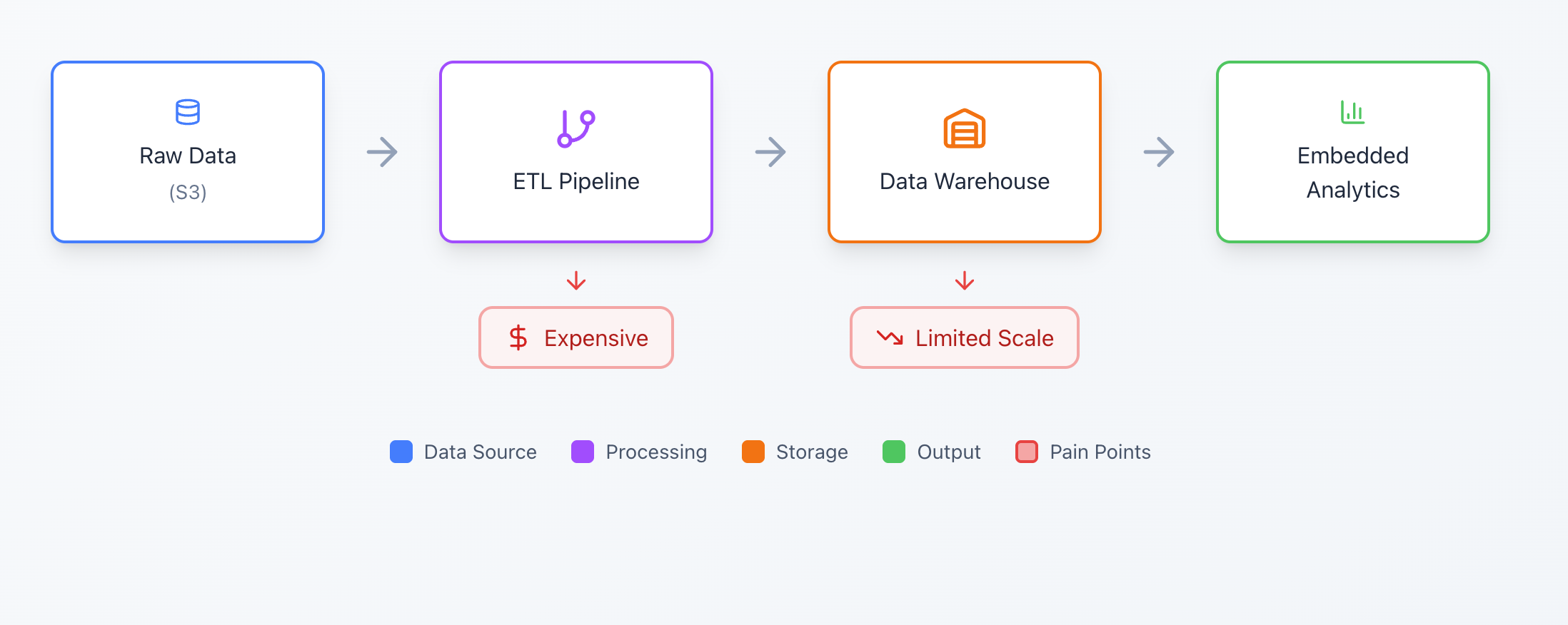
A data lakehouse combines the low-cost, flexible storage of data lakes with the query performance and ACID transactions of data warehouses. Instead of maintaining separate systems for raw data (lake) and structured analytics (warehouse), you get a unified platform.
Traditional Architecture:
Lakehouse Architecture:

Key Characteristics of Data Lakehouses
- Open File Formats — Store data as Parquet, Delta, Iceberg (not proprietary formats)
- Metadata Layer — ACID transactions, schema enforcement, time travel
- SQL Query Engine — Fast analytics without moving data
- Separation of Storage and Compute — Scale independently
- Direct Access — Query data where it lives, no ETL required
Why this matters for embedded analytics:
When your product data already lives in a lakehouse, you can embed analytics without the traditional pain points:
- No ETL pipelines to maintain
- No data replication to vendor caches
- No expensive warehouse licenses for analytics-only workloads
- Query your source of truth directly
- Scale to unlimited customers without data duplication
- Control costs with on-demand compute
Data Lakehouse Platforms: Which One for Embedded Analytics?
Not all lakehouse platforms are created equal for embedded analytics. Here's how the major options compare:
1. Databricks (Unity Catalog)
Best for: Organizations already invested in Databricks for ML/AI workloads who want to embed analytics from the same platform
Architecture:
- Storage: Delta Lake on cloud object storage (S3, ADLS, GCS)
- Compute: Serverless SQL warehouses
- Metadata: Unity Catalog with fine-grained access control
Embedded Analytics Advantages:
Unified governance - Same permissions for ML and analytics
Delta Lake performance - Optimized Parquet with indexing
Real-time streaming - Embed analytics on streaming data
Cost - Databricks compute can be expensive for high-concurrency analytics
Use Case: Fintech SaaS with ML-driven risk scoring. Embed customer dashboards showing model predictions and historical trends—all from the same Databricks workspace used for model training.
2. Snowflake
Best for: Enterprises needing zero-maintenance scaling and multi-cloud portability
Architecture:
- Storage: Micro-partitioned tables (proprietary format on cloud storage)
- Compute: Auto-scaling virtual warehouses
- Metadata: Integrated catalog with cloning and time travel
- Open Formats: Native Iceberg table support (announced 2024) for interoperability
Embedded Analytics Advantages:
Zero-ops scaling — Auto-suspend/resume for cost optimization
Data sharing — Share subsets with customers securely
Multi-region — Deploy close to customer data
Iceberg support — Query open-format tables alongside Snowflake native tables
Storage costs — More expensive than raw S3/ADLS
Use Case: B2B SaaS with 1,000+ customers. Use Snowflake's multi-cluster warehouses to isolate analytics compute per tier (free vs enterprise customers), with DataBrain handling the routing. Leverage Iceberg tables for data portability across cloud providers.
3. AWS S3 + DuckDB
Best for: Cost-conscious startups and analytics on semi-structured data (logs, CSVs, Parquet)
Architecture:
- Storage: S3 buckets with Parquet/CSV files
- Compute: DuckDB (embedded analytical database)
- Metadata: File-based partitioning schemes
How DataBrain Enables This:
DataBrain includes a built-in DuckDB integration that:
- Reads Parquet/CSV directly from S3
- Builds local indexes for fast queries
- Handles incremental syncs as new files arrive
await connection.run(query, [s3Path, tenantId]);
Lowest cost — Pay only for S3 storage (~$0.023/GB/month)
Flexible schema — Handle JSON, CSV, Parquet interchangeably
No vendor lock-in — Open formats, portable compute
Concurrency limits — DuckDB is single-process (use sharding for scale)
Use Case: Log analytics SaaS. Ingest customer application logs as Parquet files to S3, partition by customer_id, embed dashboards querying last 30 days of data.
4. Amazon Athena
Best for: AWS-native stacks with existing S3 data lakes, minimal infrastructure management
Architecture:
- Storage: S3 data lake with Glue Data Catalog
- Compute: Serverless Presto engine
- Metadata: AWS Glue for schema definitions
True serverless — No clusters to manage
AWS ecosystem — Integrates with IAM, CloudWatch, QuickSight
Cost-effective — Pay per query ($5 per TB scanned)
Query latency — Cold starts can be 3-5 seconds
Use Case: E-commerce platform with clickstream data in S3. Use Athena to query user behavior across all customers, embed filtered dashboards showing each merchant's traffic patterns.
5. Trino (formerly Presto SQL)
Best for: Querying multiple data sources (lakehouses, databases, APIs) from a single analytics interface
Architecture:
- Storage: Federates across Hive, Delta Lake, Iceberg, PostgreSQL, etc.
- Compute: Distributed SQL engine
- Metadata: Connectors to various catalog systems
-- Trino's superpower: join across lakehouse and operational DB
Use Case: Logistics SaaS with shipment data in Delta Lake and customer profiles in PostgreSQL. Use Trino to join operational and analytical data in a single embedded dashboard.
Platform-Specific Setup Guides: For detailed configuration instructions, check our complete datasource documentation:
- Databricks Setup Guide
- Snowflake Configuration
- AWS S3 Integration
- Amazon Athena Setup
- Trino Configuration
Why Embedded Analytics on Lakehouses Was Broken (Until Now)
Traditional embedded analytics tools (Tableau, Looker, Metabase embedded) were built for data warehouse architectures. When you try to use them with lakehouses, three problems emerge:
Problem 1: Query Performance Mismatch
Warehouse-era tools cache aggressively because they assume expensive query costs. But lakehouse queries on Delta/Iceberg with proper partitioning are cheap and fast. Excessive caching adds latency and staleness without benefit.
DataBrain's approach: Query directly with intelligent result streaming, not full result caching.
Problem 2: Multi-Tenant Access Control
Warehouse-era tools use database roles for permissions. But lakehouses use table ACLs (Unity Catalog), IAM policies (AWS), or RLS at the file level (Iceberg). Your analytics tool needs to understand these paradigms.
- DataBrain's approach:
- Generate guest tokens with tenant context
- Apply row-level security filters dynamically
- Route queries through appropriate lakehouse access layers
Deep Dive: Read our comprehensive guide on The Multi-Tenancy Problem in Embedded Analytics to understand DataBrain's 4-level tenancy architecture (datasource, database, schema, table) and when to use each level for optimal data isolation.
Problem 3: Cost Explosion from Data Replication
Warehouse-era tools replicate your data into their own cache. For lakehouses with petabyte-scale storage, this is economically nonsensical—you're paying twice for the same data.
DataBrain's approach:
- Never cache business data (only dashboard metadata)
- Query results are ephemeral
- Leverage lakehouse's own caching layers (Photon, Snowflake result cache)
Implementation Guide: Embed Lakehouse Analytics in 4 Steps
Let's walk through a real example: embedding Databricks analytics into a React SaaS application.
Step 1: Configure Your Lakehouse in DataBrain
DataBrain Dashboard → Data Sources → Add Datasource
For Databricks:
For AWS S3 + DuckDB:
Need Help Adding Your First Datasource?
If you're new to adding a datasource in DataBrain, check out these guides for step-by-step assistance:
- Adding a Data Source to DataBrain — Complete setup walkthrough
- Choosing the Right Tenancy Model — Match your data architecture to the right isolation level
- Configure Tenants — Set up multi-tenant access control
Use these resources to ensure your datasource is configured correctly for your architecture and security needs.
Step 2: Build Your Dashboard (No-Code or SQL)
Create metrics using SQL against your lakehouse:
DataBrain automatically:
- Validates SQL against your lakehouse schema
- Generates chart visualizations (bar, line, pie, etc.)
- Handles date filters, grouping, aggregations
- Optimizes queries with pushdown filters
New to dashboard creation? Check out:
- Create a Dashboard — Complete guide to building dashboards
- Create a Metric — Metric creation tutorial
- Custom SQL Guidelines — Best practices for SQL metrics
Step 3: Backend Integration — Generate Guest Tokens
- Your backend API generates short-lived tokens that:
- Identify the customer (tenant isolation)
- Specify which lakehouse datasource to query
- Apply row-level security filters
Node.js / Express Example:
Python / FastAPI Example:
Step 4: Frontend Integration — Embed the Dashboard
React Component:
Vue 3 Example:
Framework-Specific Integration:
- React Integration Guide — Complete React setup with hooks and TypeScript
- Vue.js Integration — Vue 3 composition API examples
- Angular Integration — Angular module setup
- Web Component API Reference — Complete <dbn-dashboard> documentation
Performance Optimization for Lakehouse Analytics
Embedding analytics on a lakehouse requires understanding lakehouse-specific optimizations:
1. Partition Pruning
Structure your lakehouse data with partition columns:
DataBrain automatically includes tenant filters:
2. Delta Lake / Iceberg Optimizations
Enable Z-ordering on frequently filtered columns:
Result: Queries filtering by tenant_id read 10-50x less data.
3. Lakehouse Result Caching
- Snowflake: Result cache automatically shares query results across users viewing the same dashboard.
- Databricks: Photon engine caches intermediate results for 24 hours.
- DataBrain leverages these by generating consistent SQL queries—same metric for different users with different RLS produces cache-friendly queries.
4. Incremental Metrics
For large historical datasets, use incremental aggregation:
- DataBrain's dynamic date filters automatically apply relative date ranges, ensuring queries stay performant as data grows.
Cost Comparison: Lakehouse vs Traditional Warehouse for Embedded Analytics
Scenario: 500 customers, each viewing dashboards 10x/month, 1TB of analytical data
Why the difference:
- Storage: S3 is ~0.023/GB vs Snowflake's ~40/TB (with compression)
- Compute: Serverless SQL only runs during actual queries
- No vendor cache: Not paying to store data twice
When to Choose Lakehouse Over Traditional Database
Choose a lakehouse when:
- You have >100GB of analytical data
- Data arrives in batches (hourly/daily) rather than real-time transactions
- You need to query semi-structured data (JSON, logs, events)
- Cost optimization is critical (startup or high data volume)
- You want to avoid vendor lock-in (open formats)
Choose traditional databases when:
- You need sub-second updates (operational dashboards)
- Data is and queries are simple
- You're already paying for a warehouse and it performs well
- Team lacks lakehouse expertise
Best of both worlds: Use DataBrain's multi-datasource support to combine:
- Operational DB (PostgreSQL) for real-time metrics
- Lakehouse (Databricks) for historical trends
- Single embedded dashboard joins both
Related Resources
Technical Deep Dive
- N-Level Tenancy Architecture — Understanding datasource, database, schema, and table-level isolation for SaaS applications
- Why Self-Hosted Embedded Analytics Matter — Self-hosted vs cloud deployment, air-gapped environments, and control requirements
- Complete embedding setup → Production Deployment Guide
Core Documentation
- Embedding Architecture Overview — How DataBrain's embedding works under the hood
- Multi-Datasource Workspaces — Configure routing to multiple lakehouses based on tenant context
- Choosing the Right Tenancy Model — Decision framework for datasource, database, schema, or table-level tenancy
- Configure Tenants — Set up multi-tenant data isolation and RLS policies
- 5-Minute Embedding Tutorial — Get your first lakehouse dashboard embedded quickly
- Production Setup Guide — Complete implementation walkthrough with security best practices
- Guest Token API Reference — Full API documentation for token generation and management
- Framework-Specific Guides — React, Vue, Angular, Next.js integration examples
Security & Compliance
- Security Best Practices — Comprehensive security guide for embedded analytics
- Multi-Tenant Access Control — RLS patterns and tenant isolation strategies
Next Steps: Start Embedding Lakehouse Analytics
As the future of embedded analytics moves toward lakehouse-native, AI-ready architectures, choosing the right platform now matters more than ever.
Ready to embed analytics from your lakehouse?
- Try DataBrain Free — Connect your Databricks, Snowflake, or S3 in minutes
- 5-Minute Tutorial — Get your first lakehouse dashboard embedded
- Talk to Sales — Get a lakehouse-specific architecture review and implementation plan


