

.png)
Key Takeaways
- AI Copilot uses natural language to SQL to convert plain-English questions into production-ready metrics, complete with SQL, visualizations, and mapped dimensions.
- Schema-aware context powered by Databrain's semantic layer delivers accurate, environment-specific SQL rather than generic query outputs.
- Session continuity preserves conversational context across follow-ups, allowing iterative analysis over days or weeks without losing progress.
- Full manual control ensures every generated query can be inspected, edited, and refined before it becomes a committed metric definition.
- Embedded in the workflow, not bolted on: AI Copilot lives inside the Create Metric page, so every output feeds directly into your metric builder.
Databrain's new AI Copilot bridges the gap between business questions and data answers, with no SQL expertise required.
Every data team has experienced this moment: a stakeholder knows exactly what metric they need, but they do not know which table holds it, which column to aggregate, or how to write the SQL to get there. They are stuck between what they want to know and what the database will let them ask.
That gap, between business intent and technical execution, is precisely why we built AI Copilot.
Today, we are announcing the launch of AI Copilot (v2-beta), an intelligent, in-product assistant embedded directly into Databrain's AI-powered analytics workflow. Simply describe what you need in plain language, and Copilot translates your question into a ready-to-use metric, complete with SQL, result data, chart suggestions, and mapped dimensions and measures. No context-switching, no waiting on your data team, and no deep SQL knowledge required.
Why Embedded Analytics Needs an AI Copilot for Metric Creation
The analytics industry is not short on AI-powered tools. Natural language to SQL has become a competitive feature across BI platforms, data notebooks, and standalone copilot products. However, most of these tools make the same mistake: they treat AI as a separate experience, a chatbot bolted onto a dashboard, disconnected from the actual workflow where metrics get defined.
We took a fundamentally different approach. Databrain's AI Copilot lives inside the Create Metric page itself, the exact place where metric definitions happen. This is not an arbitrary design choice. It is what makes the Copilot action-oriented rather than just conversational. Every output it generates (SQL queries, chart recommendations, dimension mappings) feeds directly into your metric workflow. The AI does not just answer your question; it helps you build something usable.
This design decision stems from a pattern we kept seeing across our customer base. Users generally fell into two camps:
- Speed-first users who wanted AI to generate answers fast and remove manual overhead.
- Control-first users who preferred a structured builder and wanted to inspect every detail before committing.
AI Copilot was built to serve both. You get the speed of conversational AI and the precision of a structured metric builder, working together in the same interface.
The Natural Language to SQL Problem AI Copilot Solves
If you have spent any time building metrics across data sources, you have almost certainly run into at least one of these friction points:
You know the business question, but not the SQL. You understand what "monthly active users by region" means for your business, but translating that into the right joins, filters, and aggregations across your data warehouse takes time, expertise, or both. This is exactly the gap self-service analytics is designed to close.
You know the metric you need, but not which table or column to use. Your data warehouse might have dozens of tables, hundreds of columns, and naming conventions that do not map neatly to how your business thinks about metrics. Understanding your data model should not be a prerequisite to asking a business question, but today, it often is.
You hit SQL errors and struggle to fix them. Perhaps you tried writing a custom query, but it returned an error you could not debug. For non-technical users, a single syntax issue can halt progress entirely.
You lose context when switching between manual building and AI exploration. This is a subtle but costly problem. You start exploring with AI, then switch to the metric builder to adjust something manually, and suddenly the conversation thread is gone. The AI does not know what you just changed, and you have lost the thread of your analysis.
AI Copilot eliminates these friction points by keeping everything in one place. You stay inside the Create Metric workflow, interact with your data conversationally, and maintain full manual control to refine, inspect, and adjust the output at any point.
How AI Copilot Turns Natural Language Into Metrics
Here is what the experience looks like in practice:
Ask questions in natural language. Type a question like "Show me average order value by product category for the last quarter" and Copilot interprets your intent, maps it to your data schema, and generates the corresponding SQL.
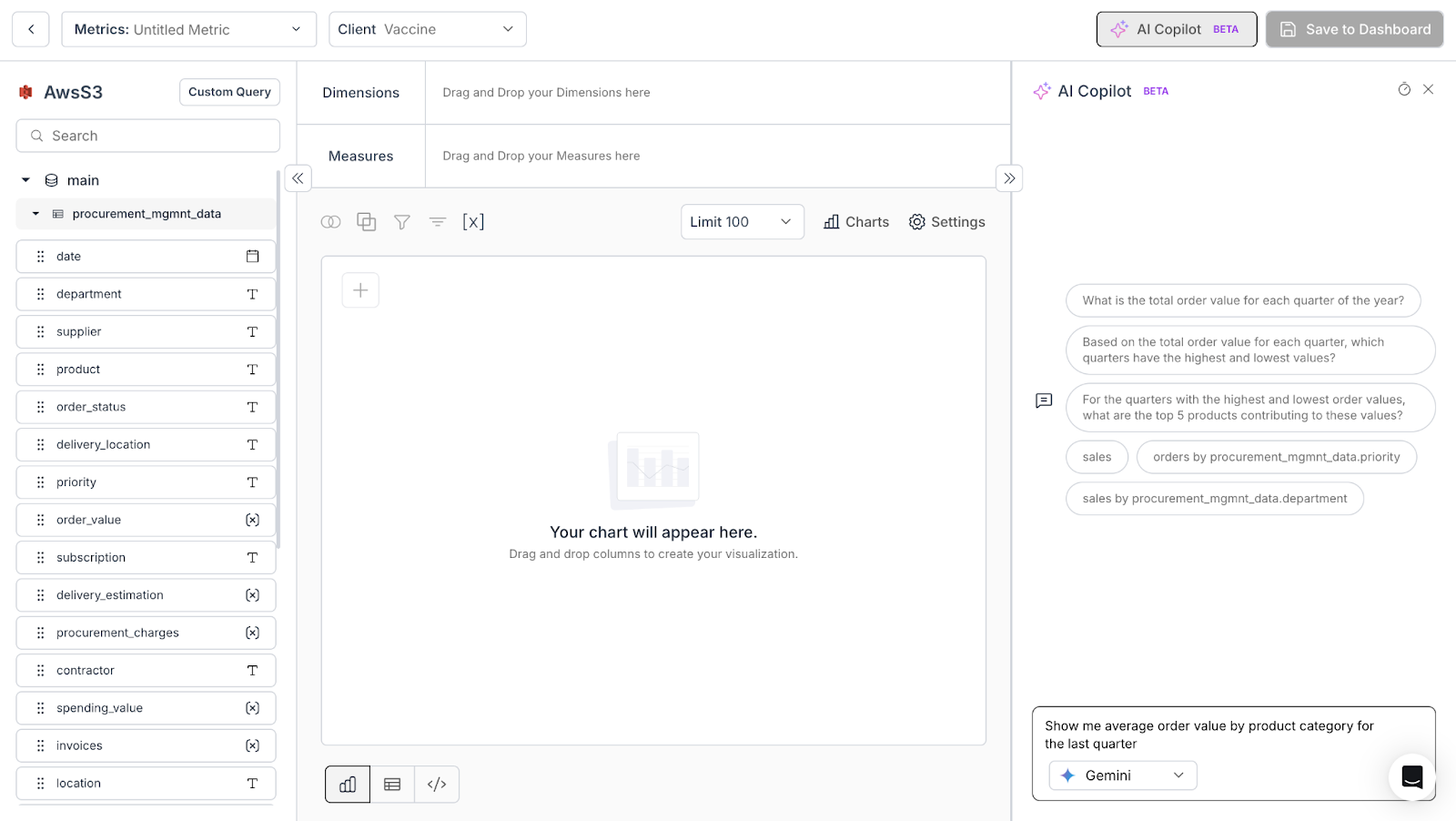
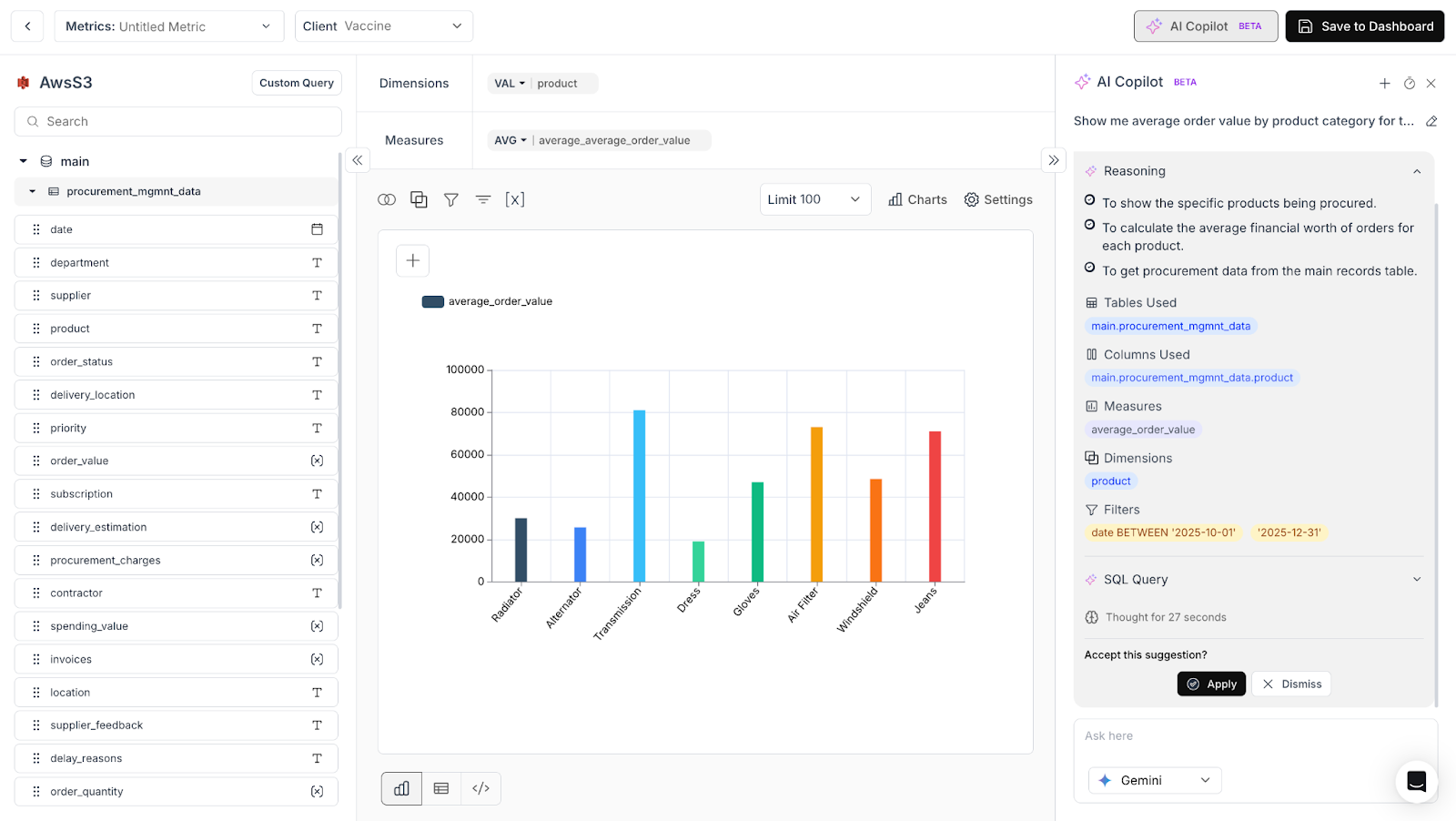
Get structured, actionable output. Copilot does not simply hand you a raw query. It returns a structured response that includes the generated SQL, the result data, chart suggestions for the best way to visualize the answer, and mapped dimensions and measures that feed directly into your metric definition.
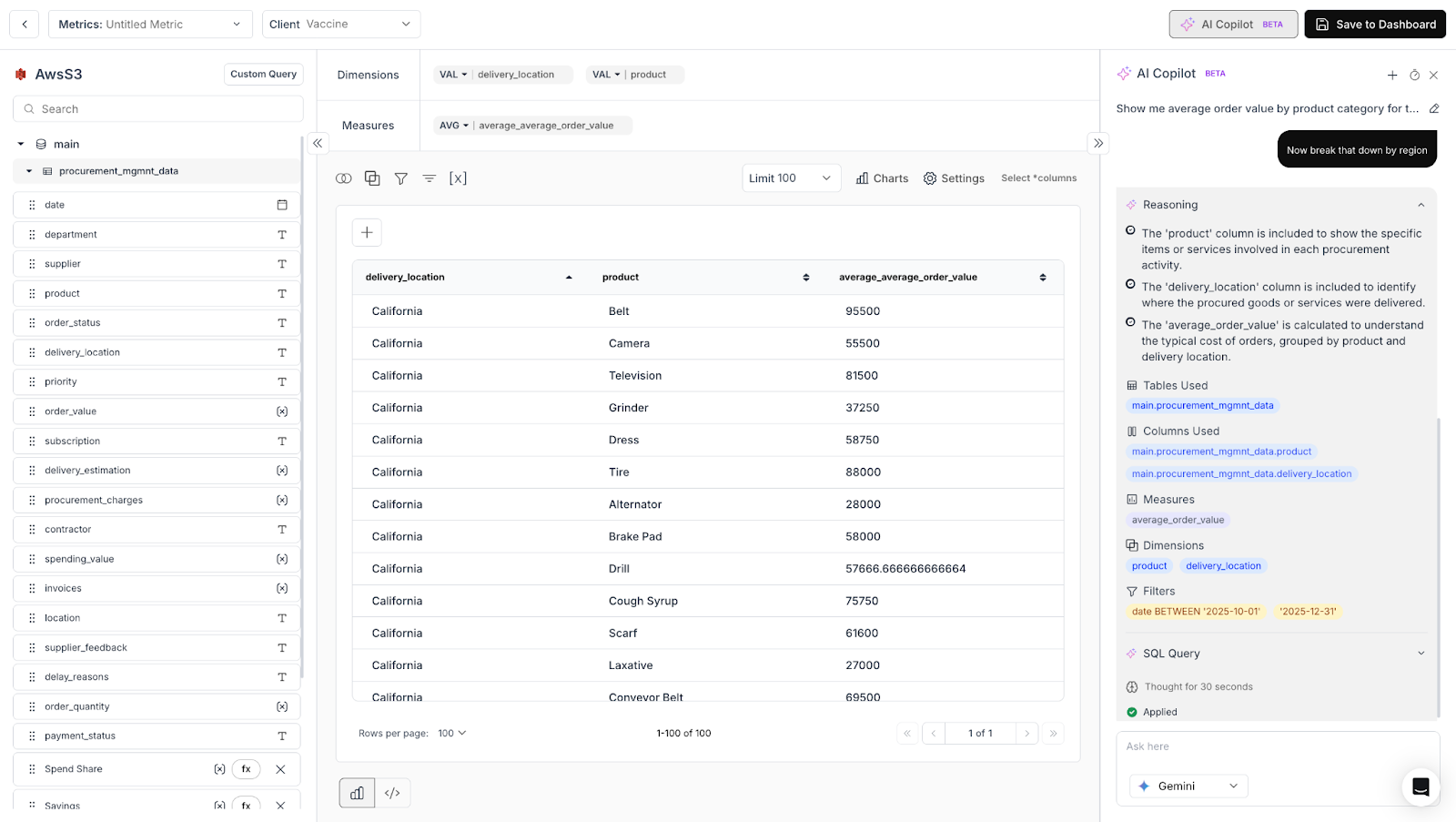
Refine without starting over. Because Copilot maintains session continuity, your follow-up questions stay connected. Ask "Now break that down by region" and Copilot builds on the previous query instead of starting from scratch. This is how real analysis works: iteratively. Copilot is built to support that.
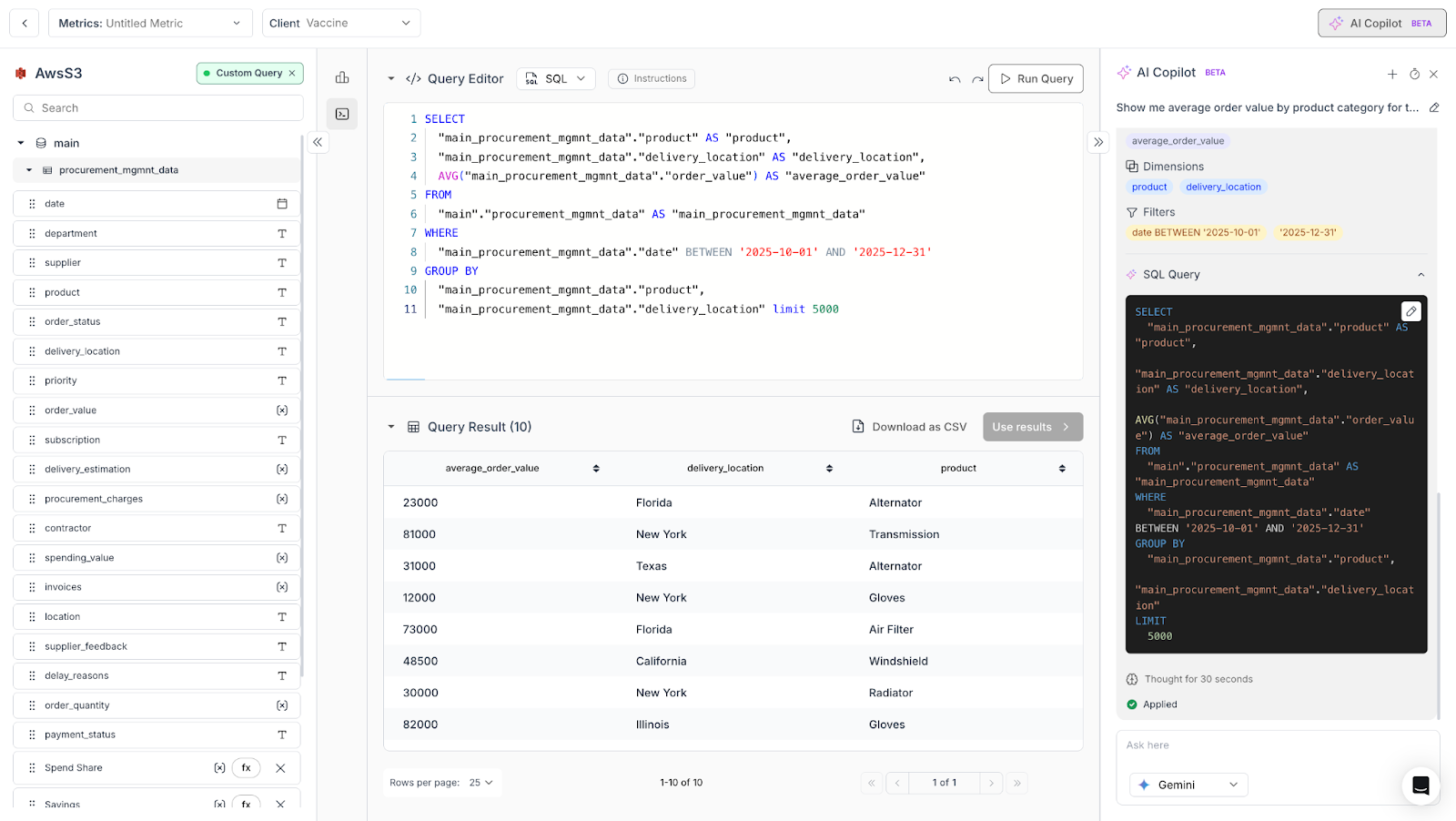
Maintain full control. AI Copilot is an assistant, not an autopilot. You can inspect every generated query, adjust dimensions or measures, swap out chart types, and edit the SQL directly. The output is always a starting point you own, not a black box you have to trust.
How Natural Language to SQL Works Under the Hood
Transparency matters when AI is generating SQL against your production data. Here is a simplified look at what happens when you ask Copilot a question:
First, the application checks whether your workspace has a valid data context and a configured language model. Then, a session is created (or an existing one is resumed) to maintain conversational continuity.
Next, the relevant context is assembled and sent to the AI query generation layer. This is where Copilot's architecture makes a real difference. Rather than sending your question to a generic language model with minimal context, Copilot enriches every request with a deep understanding of your environment, powered by Databrain's semantic layer.
The context layer pulls in your datamart schema and table relationships, messages from your current and previous sessions, learned memory from past successful conversations, and relevant semantic context retrieved through vector search. This context-aware approach is what allows Copilot to generate accurate, schema-aware SQL rather than generic queries that may not align with your specific data structure.
The AI then returns a structured response with SQL, metadata, reasoning steps, and chart-ready output. Every conversation is stored in history so you can reopen past sessions, pick up where you left off, and build on previous analyses.
The Architecture Behind Session Continuity
One of the most common frustrations with AI-assisted analytics tools is that they forget. You ask a great follow-up question, and the model has no memory of what you just discussed. AI Copilot handles this through a dedicated session management layer.
Sessions in Copilot serve as persistent conversation threads. They let the application remember a particular chat or set of conversations, maintain context across follow-up questions, and allow you to reopen and resume old conversations at any time. This means you can start an analysis on Monday, continue refining it on Wednesday, and come back to review it on Friday, all within the same conversational thread.
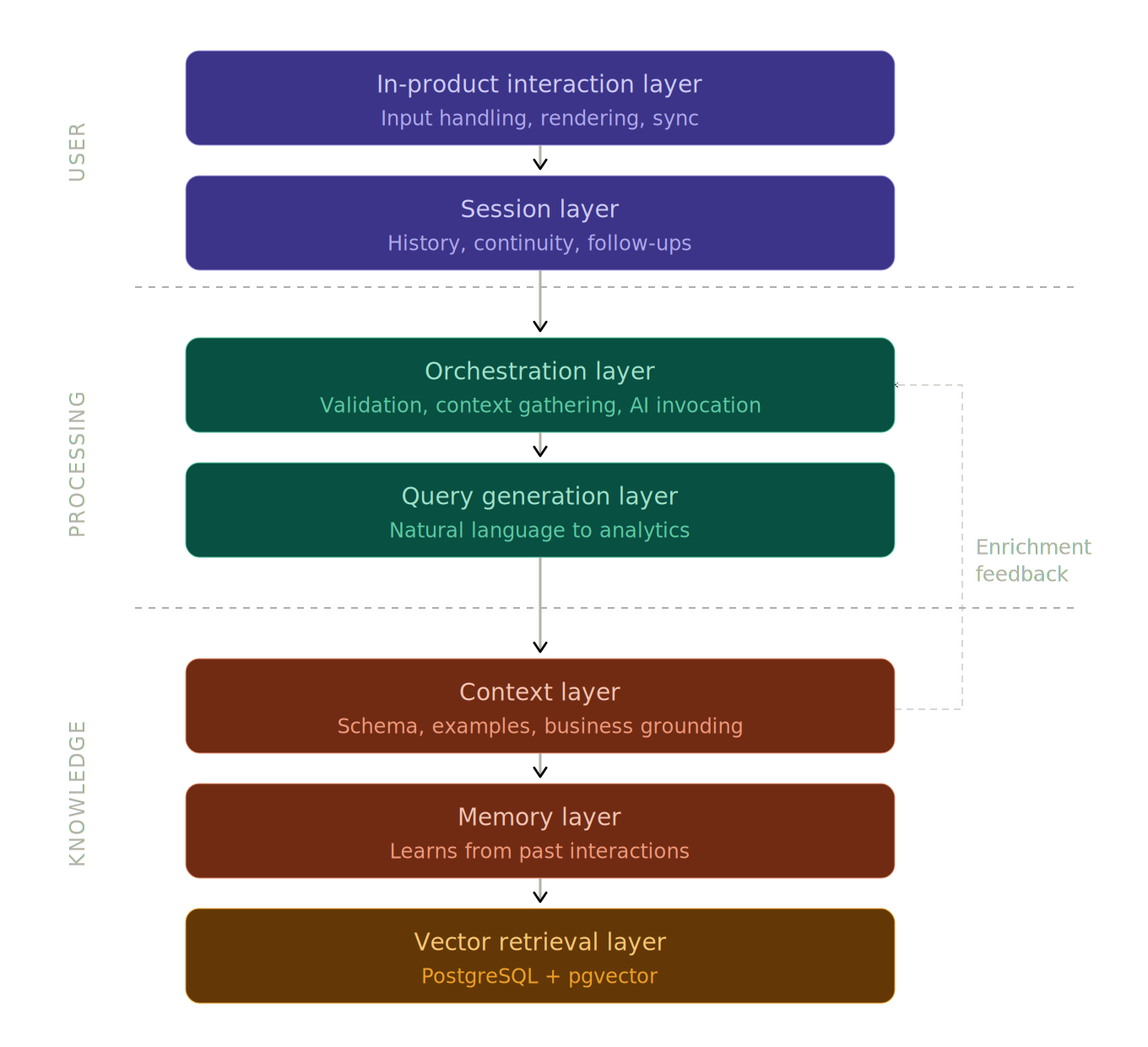
Behind this experience, Copilot's architecture consists of several coordinated layers:
An in-product interaction layer handles the user experience: input handling, result rendering, and synchronization with the surrounding metric workflow. A session layer manages conversation continuity, history, renaming, reopening, and follow-up context. An orchestration layer coordinates the full request lifecycle, including validation, context gathering, AI invocation, and response handling. A query generation layer translates natural language into structured analytical outputs. A context layer enriches each request with schema knowledge, examples, prior interactions, and business-specific grounding. A memory layer helps the system learn from successful past interactions and reuse relevant patterns. And a vector retrieval layer, powered by PostgreSQL with pgvector, supports semantic matching of previously learned facts and historical context. (For a deeper look at how AI integrates with data architectures, see our guide on AI-integrated data modeling.)
This is not a chatbot bolted onto a dashboard. It is a deeply integrated intelligence layer designed to make metric creation faster, smarter, and more reliable over time.
What This Means for Your Team
The practical impact of AI Copilot comes down to a few key outcomes:
Faster metric creation. What used to require a round trip to a data engineer ("Can you pull this metric for me?") now takes a single conversation inside Databrain. Once built, metrics feed directly into your embedded dashboards.
Lower dependency on SQL expertise. Business users, product managers, and analysts who understand what they need but not how to write SQL can now build production-quality metrics independently. This is especially impactful for customer-facing analytics where end-users need self-serve access to insights.
Session continuity that preserves context. Follow-up questions stay connected, so you can explore data iteratively without repeating yourself or losing your thread.
Context-aware responses that improve over time. Because Copilot learns from successful interactions and leverages your workspace's schema, relationships, and history, its responses get more relevant the more you use it.
Teams like EpochOS are already using Databrain's AI features to let their mortgage brokers get insights through natural language, streamlining operations with better customizations, predictable pricing, and AI-driven analytics. Read the full case study
Try AI Copilot Today
AI Copilot is available now in v2-beta for Databrain users. If you are already using Databrain's Create Metric workflow, you will find Copilot embedded directly in the interface, ready to turn your next business question into a working metric.
If you are new to Databrain, this is a great time to explore what embedded analytics with built-in AI assistance can do for your team.
Get Started in Minutes
- Existing Databrain users: Open the Create Metric page. The copilot is already there. Ask your first question and see it work.
- New to Databrain? Start a 14-day free trial with no credit card required. You will have an AI Copilot running against your data in under an hour.
- Want a walkthrough first? Book a live demo with our team. We will show you exactly how Copilot fits your stack and your use case.
Start Building Free, Book a Demo, View Pricing
Databrain is an embedded analytics platform for modern SaaS businesses. We help teams add dashboards, reports, and AI-powered metrics to their applications with flexible SDKs, APIs, and UI Kits.
Frequently Asked Questions
How is Databrain's AI Copilot different from standalone natural language to SQL tools?
Most natural language to SQL tools operate as separate interfaces, disconnected from the workflow where metrics actually get built. Databrain's AI Copilot takes a different approach: it is embedded directly inside the Create Metric page. This means every output it generates, including SQL queries, chart recommendations, and dimension mappings, feeds directly into your metric definition without requiring you to copy results between tools or switch contexts.
Do I need SQL knowledge to build metrics with AI Copilot?
No. AI Copilot is designed for users who understand their business questions but do not write SQL. You describe what you need in plain language, such as "Show me average order value by product category for the last quarter," and Copilot generates the SQL, result data, chart suggestions, and mapped dimensions and measures. Business users, product managers, and analysts can build production-quality metrics independently.
What output does AI Copilot return beyond just the SQL query?
AI Copilot returns a structured response that includes the generated SQL, the query result data, chart suggestions for the best way to visualize the answer, and mapped dimensions and measures that feed directly into your metric definition. This is what makes it action-oriented rather than just conversational: every output is ready to use inside the Create Metric workflow.
Can I edit or override the SQL that AI Copilot generates?
Yes. AI Copilot is an assistant, not an autopilot. You can inspect every generated query, adjust dimensions or measures, swap chart types, and edit the SQL directly. The output is always a starting point you own. This was a deliberate design decision to serve control-first users who want to verify every detail before committing a metric.
How does AI Copilot generate accurate SQL for my specific database schema?
Rather than sending your question to a generic language model with minimal context, Copilot enriches every request with your specific environment. The context layer pulls in your datamart schema and table relationships, messages from your current and previous sessions, learned memory from past successful conversations, and relevant semantic context retrieved through vector search. This is powered by Databrain's semantic layer, which grounds every query in your actual data structure.


