
Financial Dashboards: 12 Real Examples, KPIs & Guide (2026)
Financial dashboards provide real-time updates, improve decision-making, and enhance risk management. Learn key types, design principles, and visualization tips to optimize your financial performance.

.png)
Key Takeaways
- A financial dashboard pulls revenue, expenses, cash flow, and margins into one live screen, replacing stale spreadsheets and month-end report lag.
- Finance teams converge on 12 dashboard archetypes: 9 core (CFO executive through FP&A forecast accuracy) plus 3 specialized for financial services. All 12 are broken down below with KPIs, data sources, and refresh cadence.
- Cloud-based planning, budgeting, and forecasting is the top technology investment for CFOs right now, named by 43% of respondents in Deloitte's Q1 2026 CFO Signals survey.
- Stick to 5-8 KPIs. Forty metrics on one screen isn't a dashboard. It's a mess with better fonts.
- Design for the question, not the data. If nobody opens it, it doesn't matter how pretty it looks.
Key Takeaways
- A financial dashboard pulls revenue, expenses, cash flow, and margins into one live screen, replacing stale spreadsheets and month-end report lag.
- Finance teams converge on 12 dashboard archetypes: 9 core (CFO executive through FP&A forecast accuracy) plus 3 specialized for financial services. All 12 are broken down below with KPIs, data sources, and refresh cadence.
- Cloud-based planning, budgeting, and forecasting is the top technology investment for CFOs right now, named by 43% of respondents in Deloitte's Q1 2026 CFO Signals survey.
- Stick to 5-8 KPIs. Forty metrics on one screen isn't a dashboard. It's a mess with better fonts.
- Design for the question, not the data. If nobody opens it, it doesn't matter how pretty it looks.
Most finance teams are still making million-dollar decisions based on spreadsheets someone updated last Tuesday. Meanwhile, the data already existed to flag the problem two weeks ago. It was just trapped in six different tabs nobody reconciled.
A financial dashboard fixes that. One screen. Real-time numbers. No more guessing, no more stale reports landing in inboxes three days too late. And the gap between teams running on live dashboards and ones still stitching together Excel tabs at month-end? It's getting wider every quarter.
The money is following the same shift. The global financial analytics market is projected to grow from $11.86 billion in 2026 to $27.36 billion by 2034, an 11% compound annual growth rate (Fortune Business Insights, 2026). That growth isn't hype. It's finance teams getting tired of being the last ones to know what their own numbers look like.
This guide breaks down the 12 financial dashboard examples that actually drive decisions, the KPIs worth tracking, design choices that separate useful dashboards from expensive wallpaper, and how to pick the right tool for your situation.
What Is a Financial Dashboard, Really?
A financial dashboard is a single screen that shows how your money is moving: revenue coming in, cash going out, margins holding or slipping, all updating live from your actual data sources. It replaces the manually built report with a shared, always-current view of financial performance.
How is that different from the spreadsheet your finance team already maintains? Three things. First, a dashboard connects directly to your data sources: your ERP, accounting software, CRM, payment systems, so numbers update automatically. No manual entry, no version control nightmares. Second, it uses data visualization in a way that makes patterns obvious. A line chart showing cash flow dipping over four consecutive weeks tells a story that a column of numbers in Excel never will. Third, dashboards are shared by default. Everyone from the controller to the founder sees the same financial performance dashboard at the same time.
The old way? Someone on the finance team spends two days building a report in Excel. By the time leadership reads it, half the numbers are stale. Dashboards kill that lag. They give CFOs, controllers, FP&A folks, and founders a shared view of reality, not someone's interpretation of a spreadsheet from last Tuesday.
If you've used a fitness tracker, you already understand the concept. Except instead of tracking steps, you're watching burn rate.
Financial dashboard vs. fintech dashboard: not the same thing
One distinction worth making before we go further. A financial dashboard is a working tool used by a company's finance team to monitor its own financial performance: the audience is internal (CFOs, controllers, FP&A analysts, treasurers). A fintech dashboard is built into a fintech product and serves the fintech's customers: tenant-isolated infrastructure, PCI-DSS overlay, sub-minute freshness expectations. Same domain, different audience, different infrastructure. This guide covers the finance-team side. If you're a product team shipping analytics to your own customers, start with fintech data analytics instead.
Why This Matters More in 2026 Than It Did Two Years Ago
The short answer: there's more data, more speed, and less tolerance for surprises. In Deloitte's Q1 2026 CFO Signals survey, cloud-based planning, budgeting, and forecasting was the most-cited technology investment, chosen by 43% of CFOs (Deloitte, 2026). Finance chiefs are putting real budget behind faster, live financial visibility.
The AI wave compounds it. According to Precedence Research, the AI in data analytics market is projected to grow from $40.3 billion in 2026 to $310.97 billion by 2034. Financial forecasting, expense management, and real-time reporting are where that investment is landing hardest. If your competitors are making decisions with AI-powered finance tools and you're still waiting on monthly reports, that's not a style difference. That's a speed disadvantage.
Real-Time Financial Visibility
You can see money moving in real time. Cash positions, revenue trends, expense spikes, they show up as they happen. That matters because the gap between catching a liquidity problem early and scrambling to make payroll is usually measured in days, not weeks.
Faster Decision-Making with Data
Your leadership team stops arguing about the numbers. When everyone stares at the same budget vs. actual variance chart, the conversation shifts from "what are the numbers" to "what do we do about them." That's a fundamentally different meeting. No more three-day back-and-forth to align on what the numbers even say.
Risk Management and Fraud Detection
Risk stops being something you discover after the fact. Debt-to-equity ratios creeping up? Customer credit scores dropping? A suspicious transaction that's way above your normal range? A good financial reporting dashboard catches those patterns while you still have options. You can set alerts for anomalies and investigate before the damage compounds.
Cross-Team Transparency and Accountability
Stakeholders stop asking you for reports. When the board, the department heads, and the investors can all look at the same dashboard, you stop playing telephone with financial information. That alone saves hours every week. It also makes accountability concrete so everyone can see which departments are hitting targets and which ones aren't.
Regulatory Compliance, Audit Readiness, and Data Trust
Auditors have less to complain about, and stakeholders trust the numbers more. A properly structured dashboard with access controls creates a built-in paper trail: timestamped, role-based access logs instead of a folder of emailed spreadsheets. The trust part comes from drill-to-source: when any KPI can be clicked open to the underlying ledger transactions, the number stops being an assertion and becomes a breadcrumb trail anyone can follow. That single capability answers the most common stakeholder objection ("where did this number come from?") before it's asked.
The 9 Financial Dashboard Examples Every Finance Team Eventually Builds
Finance teams keep converging on the same set of dashboards as they move away from quarter-end spreadsheet rebuilds toward live, system-of-record views. The 9 below are that set, in roughly the order teams build them. Most build 2-3 in their first year and add the rest as the function matures.
A quick frame that helps before diving in: dashboards split into three types by audience. Informational dashboards give executives a scannable status read (the CFO executive and treasury views below). Analytical dashboards help managers work a problem (P&L variance, AR/AP, cost-of-revenue). Exploratory dashboards let analysts interrogate the data (FP&A forecast accuracy). Knowing which type you're building keeps the design honest.
1. CFO Executive Dashboard
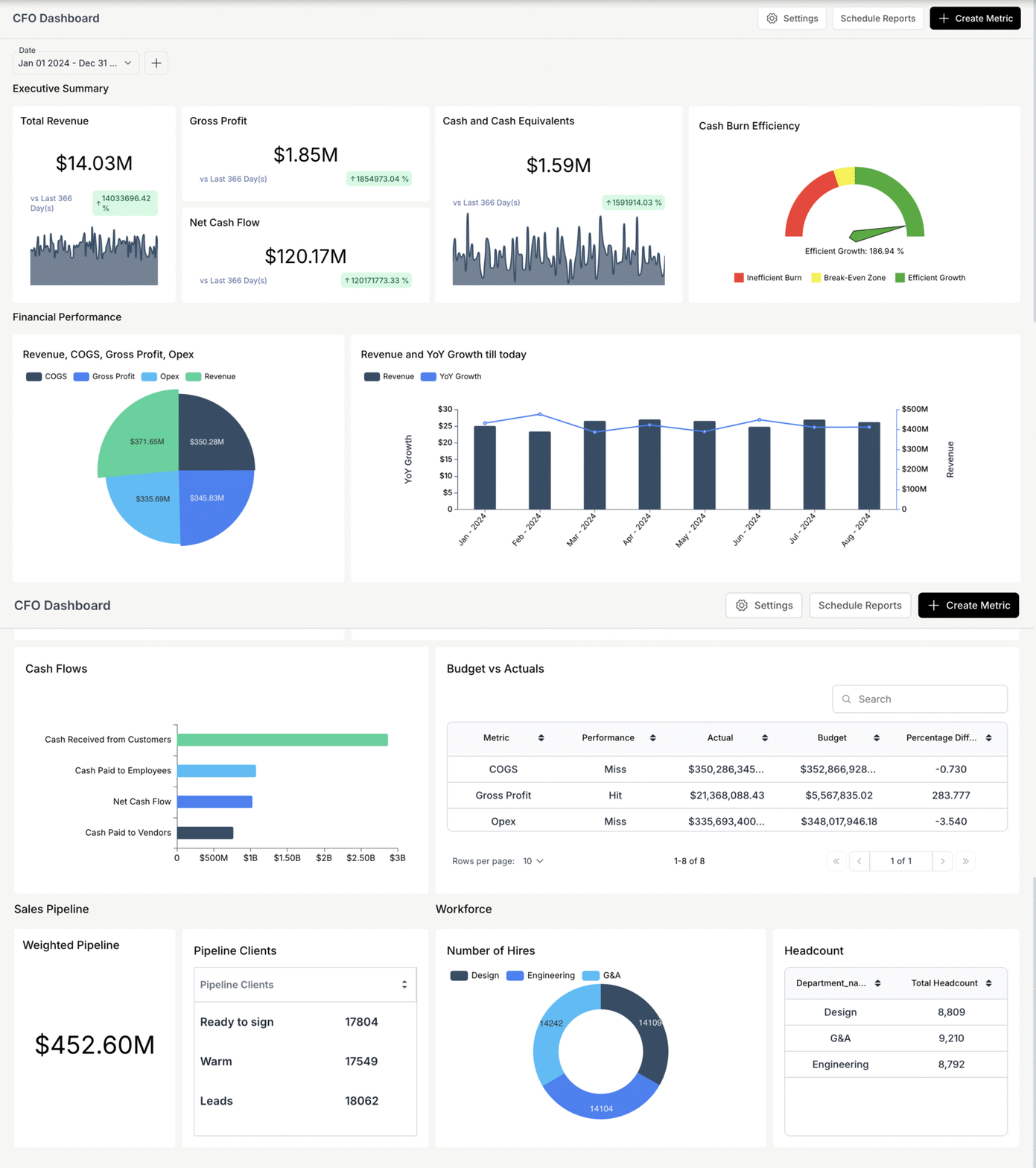
Audience: CFO + senior finance leadership; reviewed weekly, surfaced quarterly to the board. KPIs surfaced: Cash position + runway, ARR / MRR + growth rate, gross margin, EBITDA / operating margin, capital efficiency (CAC payback, Rule of 40), forecast accuracy.
Data sources: ERP, internal CRM (for ARR), HRIS (for headcount cost), banking aggregator. Refresh cadence: Daily for cash position; weekly for ARR, growth, and capital efficiency.
Design notes: Above-the-fold real estate goes to runway gauge + cash trend + 4 KPI cards (one per category). The CFO opens this first thing every morning; the dashboard has to load fast and surface anomalies in the first three seconds. The CFO dashboard guide covers the layout, cadence, and metric-selection deep-dive in detail.
2. P&L Variance Dashboard
Audience: CFO, FP&A team, department heads (for their own slice).
KPIs surfaced: Revenue actual vs budget vs prior-period, by department/cost-center, gross-margin variance, operating-expense variance by category, contribution margin by product line.
Data sources: ERP general ledger, budget/forecast system, departmental breakdown taxonomy. Refresh cadence: Daily-to-weekly during the close cycle; monthly for full reporting.
Design notes: Waterfall visualizations are the canonical P&L-bridge view (last quarter to this quarter, budget to actual). Pair with a tabular variance summary because waterfall is read approximately and finance teams need exact-value reads. Drill from any variance line to the underlying transactions: the most common workflow is "click on the variance, see the transactions that caused it."
3. Cash Flow Forecasting Dashboard
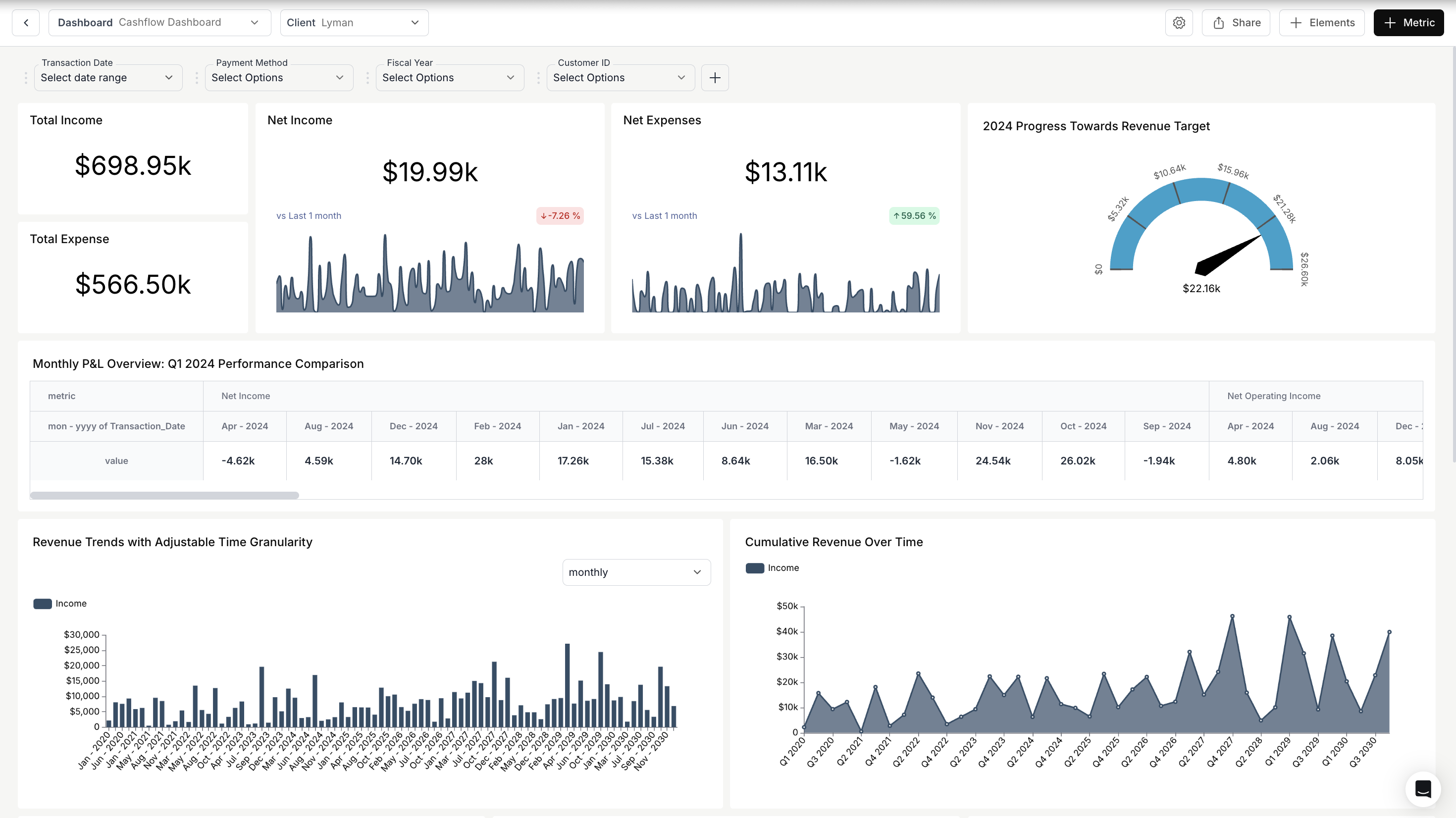
Audience: CFO, treasurer, FP&A leads. This is where CFO technology budgets are concentrated right now (see the Deloitte CFO Signals data above).
KPIs surfaced: 13-week rolling cash forecast, cash collections by week (AR forecast), planned outflows by week (AP + payroll + capex), liquidity buffer, scenario comparison (base / downside / upside).
Data sources: AR aging + AR forecast model, AP commitments, payroll schedule, capex commitments, banking balances.
Refresh cadence: Weekly for the rolling forecast; daily for actual-vs-forecast variance. Design notes: The rolling 13-week view is the standard finance-team forecast horizon: short enough to be accurate, long enough to surface trouble before it becomes a covenant breach. Show three scenarios (base, downside, upside) on the same chart, with the difference between them annotated. Most cash-flow forecasts fail by communicating only the base case; the value of the dashboard is in the scenario comparison.
4. AR Aging Dashboard
Audience: Controller, AR team, occasionally CFO during cash crunches.
KPIs surfaced: Outstanding AR by aging bucket (current, 30, 60, 90, 120+), Days Sales Outstanding (DSO), bad-debt provision, collection rate, top-N customers by overdue balance.
Data sources: AR sub-ledger, customer master, payment history.
Refresh cadence: Daily; AR teams work this dashboard hourly during collection cycles.
Design notes: Heavy use of work-queue patterns: the dashboard is also the to-do list. Pair the aggregate KPI view with a transaction-level drill so collectors can act on individual invoices without leaving the dashboard. Surface the top-10 most-overdue customers above the fold; collection effort is heavily concentrated in the long tail.
5. AP Dashboard
Audience: Controller, AP team, occasionally treasurer.
KPIs surfaced: Outstanding payables by aging bucket, Days Payable Outstanding (DPO), supplier-risk concentration (top-N suppliers by spend, top-N by overdue balance), payment-cycle status (approved / scheduled / paid).
Data sources: AP sub-ledger, supplier master, banking, payment-execution system (Bill.com, Tipalti).
Refresh cadence: Daily; AP teams work this dashboard hourly during payment cycles. Design notes: The AP dashboard is the AR dashboard's structural mirror: same patterns, opposite direction. Add a payment-execution-status workflow (which payments are approved, scheduled, executed, settled) because AP teams typically need to manage timing, not just see balances.
6. Balance Sheet Dashboard
Audience: Controller, CFO; surfaced quarterly to the board and auditors.
KPIs surfaced: Working capital (current ratio, quick ratio), cash and equivalents by entity, debt-to-equity and debt-to-asset ratios, AR and AP balances tied out to the ledger, asset composition (current vs fixed), retained earnings trend.
Data sources: ERP general ledger (consolidated layer), banking balances, debt schedule, fixed-asset register.
Refresh cadence: Monthly at close; weekly for the working-capital trend.
Design notes: A balance sheet is a point-in-time statement, so the dashboard's job is to add the time dimension: pair every balance with a 13-period trend so drift becomes visible before it becomes a covenant conversation. Working-capital ratios go above the fold. And build in a tie-out check against the general ledger, because a balance sheet dashboard that disagrees with the statements your auditors see is worse than no dashboard at all.
7. Treasury / Liquidity Dashboard
Audience: Treasurer, CFO, occasionally board.
KPIs surfaced: Total liquidity by bank/account/currency, FX exposure (net position by currency), debt covenants (status vs threshold), interest-rate exposure, investment-portfolio yield.
Data sources: Banking aggregator (multi-bank), debt-service tracker, FX rate feed, investment-portfolio system.
Refresh cadence: Daily for balances and FX; intra-day for FX during volatile periods.
Design notes: Multi-bank, multi-currency by definition: the dashboard's first job is to show total liquidity in a base reporting currency, with drill into bank/account/currency breakdown. Cover the debt-covenant status prominently (covenants are the silent killer; missing one triggers acceleration clauses). FX exposure should always be net position by currency, not gross.
8. Cost-of-Revenue Dashboard
Audience: CFO, FP&A, head of operations, head of product (for product-line gross margin).
KPIs surfaced: Gross margin by product, gross margin by customer segment, gross margin by region/channel, COGS allocation method audit, contribution margin, unit economics.
Data sources: ERP general ledger, COGS allocation taxonomy, customer/product master, regional/channel sales data.
Refresh cadence: Monthly for full reporting; weekly for gross-margin trend. Design notes: Most useful drill path is "show me gross margin by [dimension]": by product, by customer, by region, by channel. The dashboard should expose all four dimensions consistently, not just the one that was easy to build. COGS allocation method is the largest source of cross-team disagreement on this dashboard; make the allocation rules visible alongside the numbers.
9. FP&A / Forecast Accuracy Dashboard
Audience: FP&A team, CFO during planning cycles, occasionally board. Planning horizons are stretching too: CFOs report a growing focus on longer-term planning in McKinsey's CFO survey, which makes forecast accuracy a board-level metric rather than a back-office one.
KPIs surfaced: Forecast accuracy by line item (Mean Absolute Percentage Error vs actual), forecast bias (over- or under-forecasting trend), confidence intervals on forward forecast, scenario sensitivity.
Data sources: Historical forecast vs actual, FP&A planning system (Adaptive, Anaplan, Pigment, Mosaic), ERP for actuals.
Refresh cadence: Monthly during the close cycle; quarterly for board-level forecast accuracy reporting. Design notes: The most-requested view is "where do we forecast worst, and where best": line-item MAPE charts surface this directly. Pair with a forecast-bias indicator (are we systematically over- or under-forecasting in a particular category?), because biased forecasts are operationally fixable in a way that just-noisy forecasts aren't.
3 Specialized Dashboards for Financial Services
If you're in lending, banking, or asset-heavy industries, three more dashboard types are worth knowing about. Together with the 9 above, they round out the 12 examples this guide covers.
Risk Management Dashboard
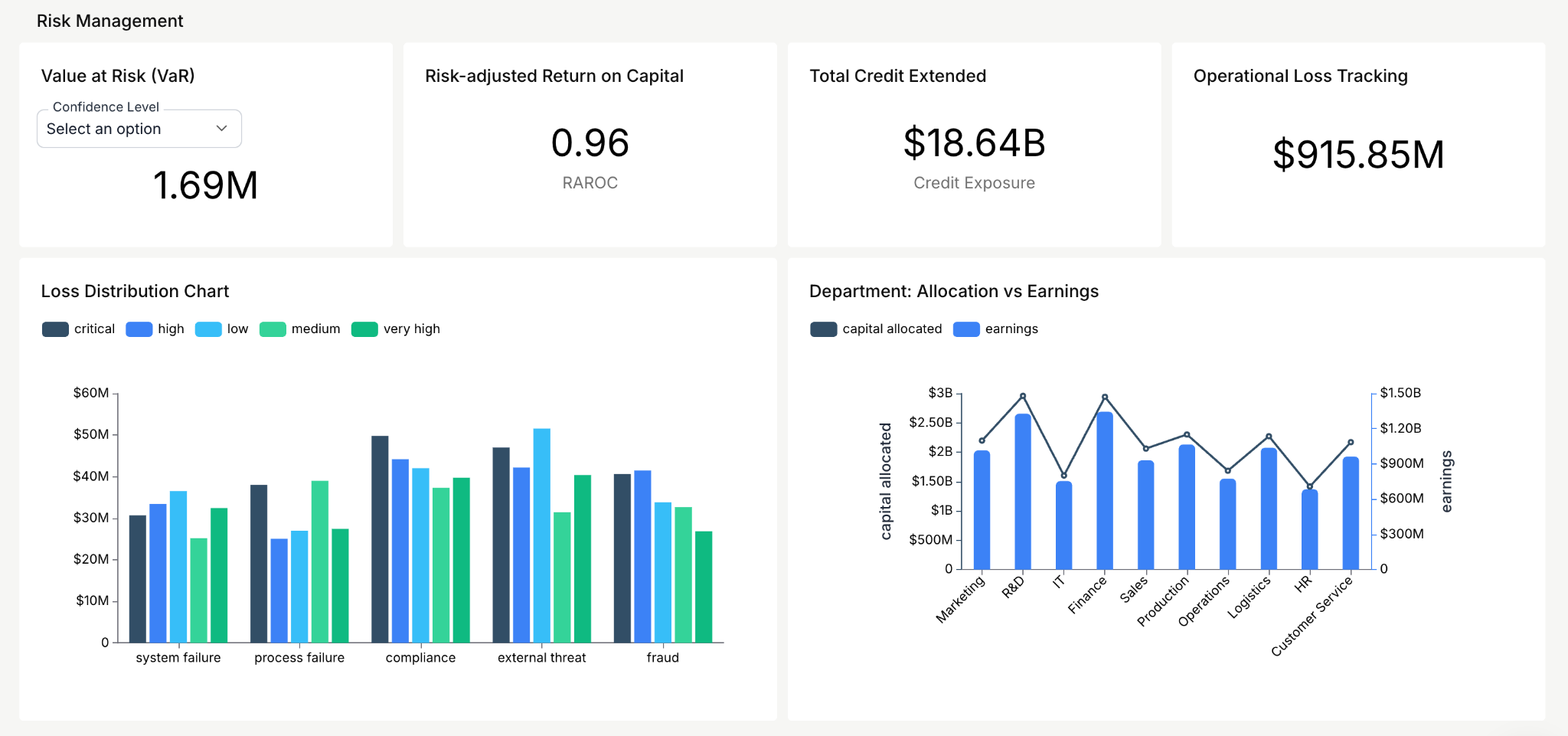
This one gives you a live read on potential threats to your company's financial health. The core metrics: value at risk and risk-adjusted return on capital. If you're making lending decisions or managing a portfolio, this dashboard tells you where the exposure is building before it becomes a write-off.
Asset Management Dashboard
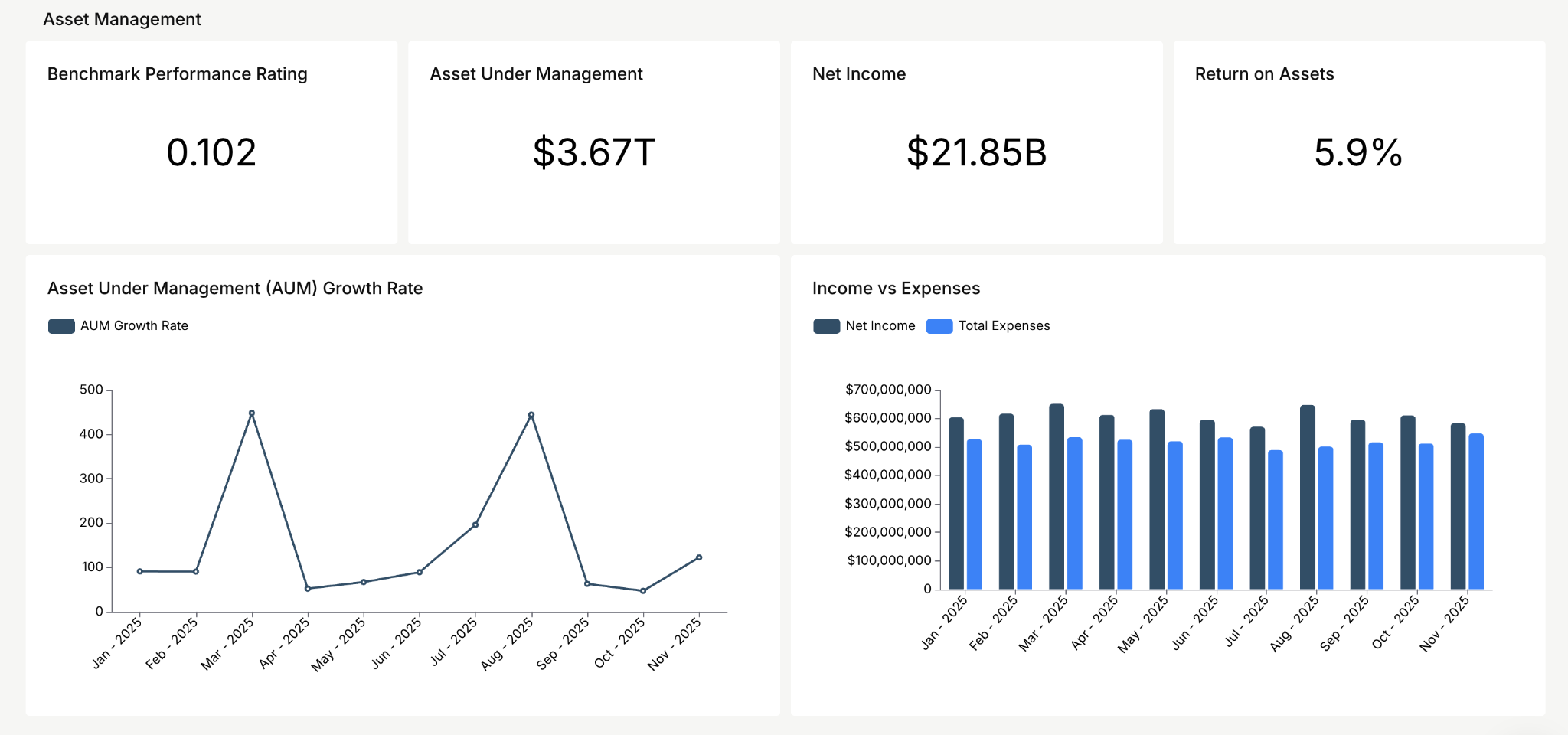
Focused on how efficiently your organization puts its assets to work. Start with return on assets and net income: if those two numbers are trending the wrong direction, nothing else on any other dashboard matters much. Teams managing an actual investment portfolio then layer in risk-adjusted return (Sharpe ratio), performance against a benchmark index, and asset-allocation drift with rebalancing alerts, so "how are the assets doing" always comes with "compared to what."
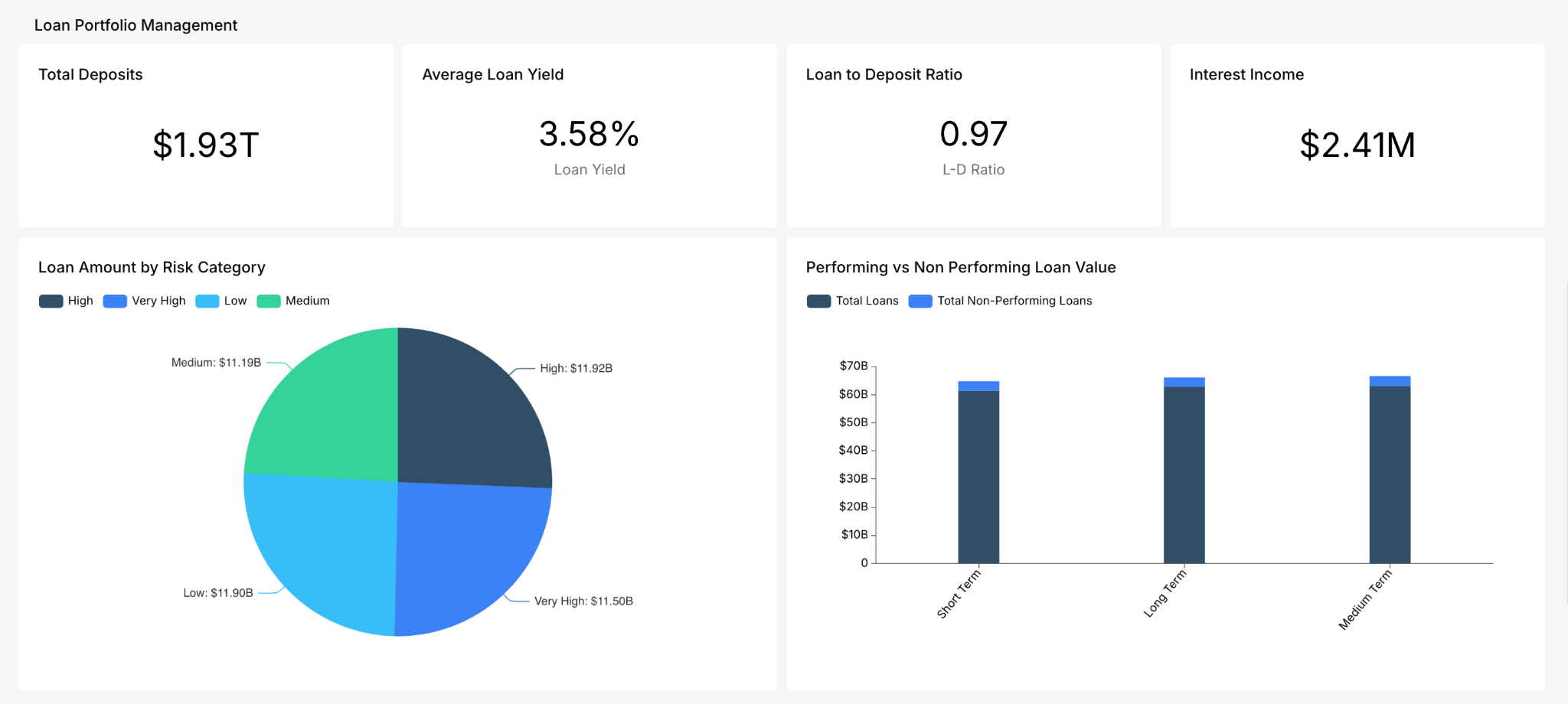
Loan Portfolio Management Dashboard
Tracks how your loan book is actually performing. Key metrics: average loan yield and interest income. If you're in financial services and you're not watching these in real time, you're reacting to portfolio risk instead of managing it.
Which Dashboard Should You Build First?
Build the CFO executive dashboard first, then add the rest as company stage demands them. Most finance teams converge on this sequence:
Key Financial Charts and KPIs in Action
Theory is useful. Seeing the actual data visualized is better. Here's a look at the key charts and KPIs from the DataBrain finance dashboard and why each one earns its spot on the screen.
Charts
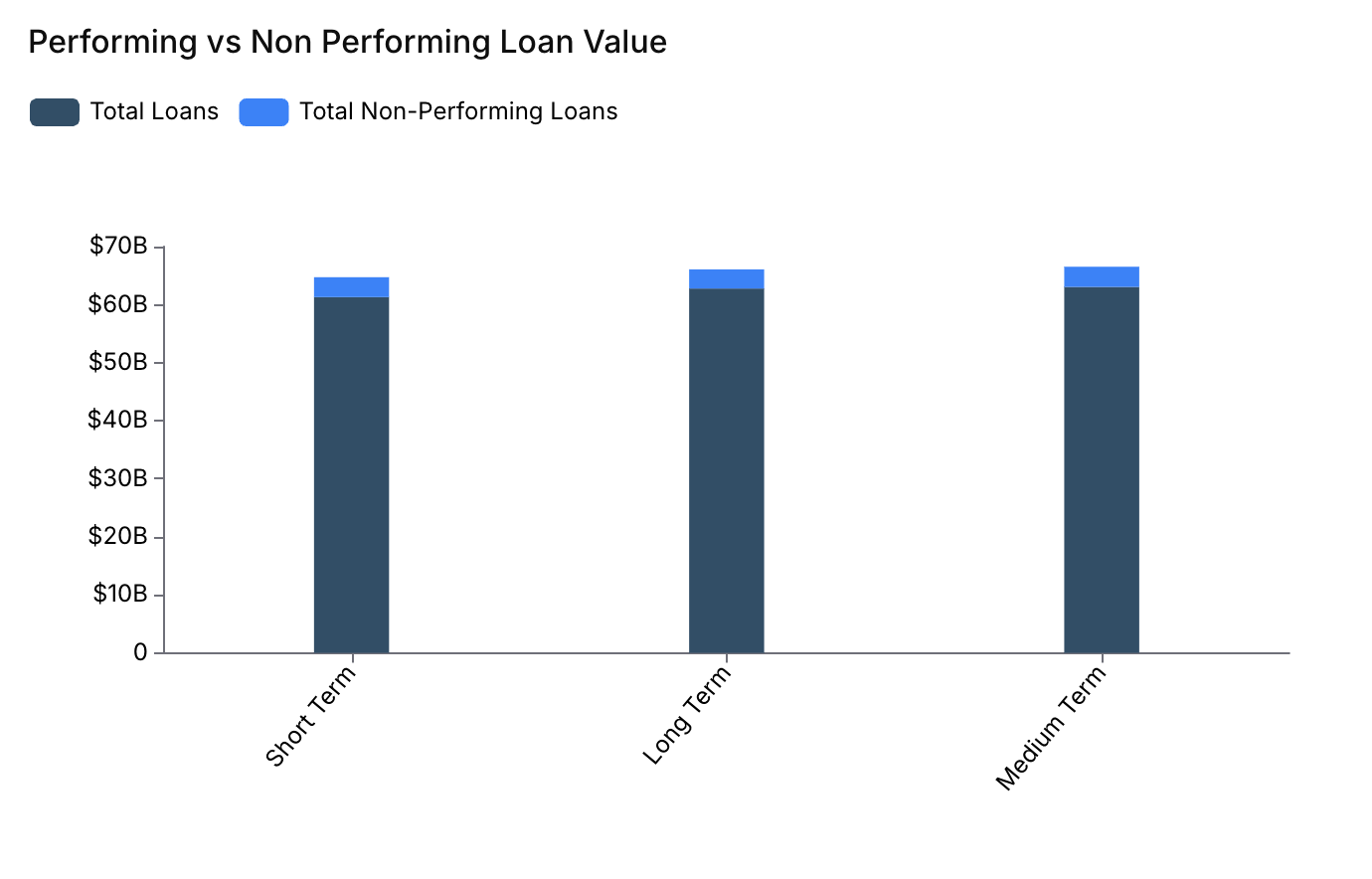
Performing vs. Non-Performing Loan Value
This chart compares performing and non-performing loans across short-term, long-term, and medium-term categories. A performing loan means the borrower is paying back on schedule and the full amount is expected. A non-performing loan means the borrower stopped paying and the lender might not recover the full amount. This breakdown helps you spot which loan terms carry the highest default risk so you can take action before the losses pile up.
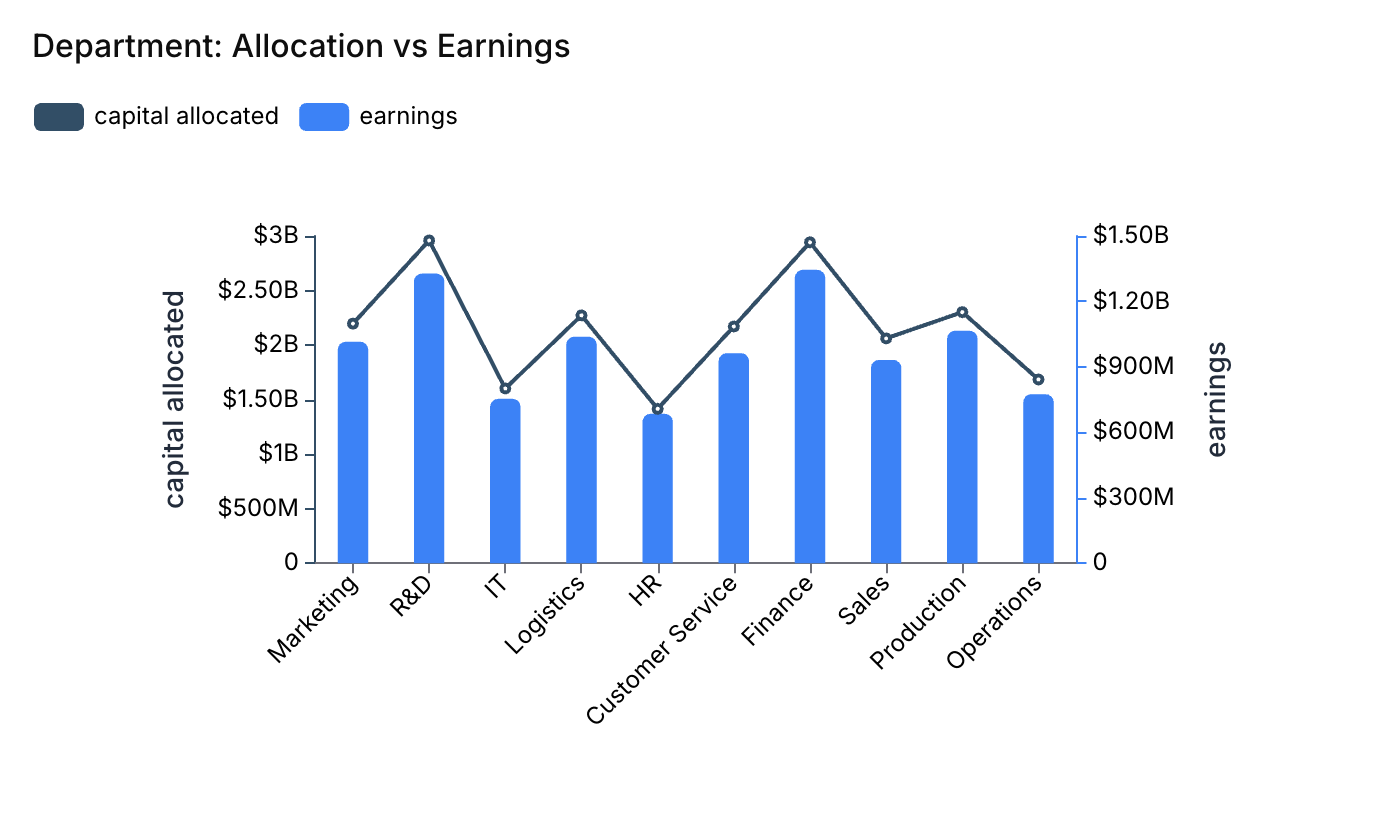
Department: Allocation vs. Earnings
Allocation is the budget a department gets to spend. Earnings are the revenue that the department brings in. For example, the finance department might get $100,000 for advertising and investment. The sales department might earn $500,000 from selling financial services. When a department earns more than its allocation, it's pulling its weight. When it earns less, there's a conversation to be had. This comparison helps leadership figure out where to put money next quarter.
KPI
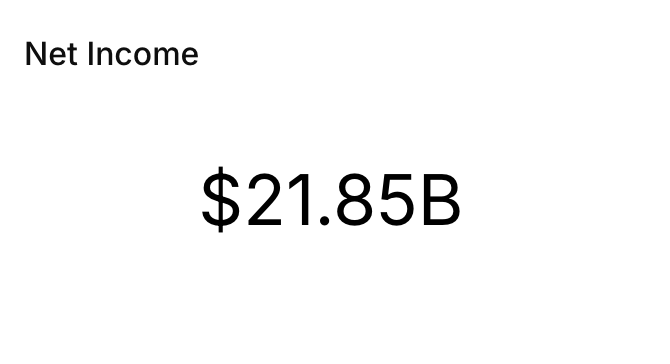
Net Income
Net income is what's left after you've paid every expense. Why does it belong on a dashboard? Because it tells you the overall health of your business at a glance. It drives decisions about spending and investing, and it feeds into nearly every other financial metric you track. If you only had room for one number on your dashboard, this would be a strong candidate.
These metrics are taken from the DataBrain finance dashboard. Explore the complete DataBrain finance dashboard.
Which KPIs Belong on Your Dashboard? Depends on Your Business.
The right financial KPI dashboard is built around decisions, not data availability. This is where people go wrong: they Google "financial dashboard KPIs" and dump every metric they find onto one screen. Don't do that.
Universal Financial KPIs
Every business needs these on their dashboard regardless of industry: revenue (monthly + YTD), gross profit margin, net income, operating cash flow, working capital management metrics, EBITDA, and budget vs. actual variance. These are table stakes. If your dashboard doesn't start here, it's not a financial dashboard, it's a vanity project.
SaaS & Subscription KPIs
SaaS and subscription companies need to layer in MRR, ARR, churn rate, LTV/CAC ratio, burn rate, and net revenue retention. These SaaS financial dashboard metrics separate the companies growing sustainably from the ones just burning cash with nice charts. If you're running a subscription business and your dashboard's executive-facing KPIs don't include these, you're missing the story your investors care about most. For pure metric definitions and benchmarks, see fintech KPIs and metrics.
E-Commerce KPIs
E-commerce should track average order value, contribution margin, inventory turnover, return rate, and customer acquisition cost by channel. Profit margin monitoring matters more here than top-line revenue: a company doing $10M in sales with 3% margins isn't in a fundamentally different position than one doing $1M with 30% margins.
Professional Services KPIs
Professional services need utilization rate, revenue per employee, project margin, pipeline value, and average billing rate. ROI tracking on client engagements is what separates firms that grow from firms that stay busy but flat.
Here's the rule of thumb that actually works: pick 5 to 8 KPIs your team makes real decisions with. If a metric sits on the dashboard for three months and nobody references it in a meeting, kill it. A dashboard with 40 numbers is just a spreadsheet wearing a suit.
Designing a Dashboard People Will Open More Than Once
Most dashboards die quiet deaths. Someone builds it, leadership says "looks great", and within six weeks nobody checks it. Here are the financial dashboard design best practices that actually prevent that.
Start with a question, not a dataset. Before you touch a chart builder, answer this: what decision does this dashboard help someone make? Can't answer it? You're building decoration, not a tool. This is the most important financial dashboard design principle and the one most teams skip.
One page. That's it. The second someone has to scroll or click through tabs to find what they care about, you've lost them. Put the 5-8 metrics that matter at the top. Net income, cash flow, revenue: those go above the fold, every time.
Color means something. Use it that way. Red for targets missed. Green for targets hit. Yellow for "keep an eye on this." Trend arrows and sparklines let people scan instead of read. A good financial dashboard communicates in five seconds flat.
Numbers alone are useless. Context is everything. Revenue of $2.4M means nothing by itself. Revenue of $2.4M vs. $2.1M last month vs. a $2.6M target, now you have a story. Always pair metrics with comparisons: prior period, budget, target.
Make every number auditable. The fastest way to lose a stakeholder is a KPI they can't trace. Wire drill-downs from every headline metric to the transactions underneath it. When the CFO can click from "gross margin dipped 2 points" straight to the invoices that caused it, the dashboard earns trust that a static report never will.
Pick chart types that match the data. Time-series line charts for trends (revenue, cash, AR balance over time). Stacked bars for composition (revenue mix by product, AR aging by bucket). Waterfalls for additive bridges (P&L variance, cash bridge). KPI cards with sparklines for at-a-glance reads. Once you have more than three slices, a pie chart turns into a guessing game. Simplify data points: weekly averages instead of daily noise.
Build for the phone. Your CFO will check this at the airport. During a meeting. In an Uber. If it falls apart on mobile, you lose your most important user.
Then test it. With actual humans. Ask three people to find a specific number on the dashboard. Watch where they click. Watch where they hesitate. Fix those spots. Version one is never the final version and that's fine.
How to Build a Financial Dashboard: Step-by-Step
Knowing what makes a good dashboard is one thing. Actually building one is where most teams stall. Here's the process that works whether you're using dashboard software like DataBrain, Power BI, or even a cloud-based financial dashboard tool you haven't picked yet.
.png)
Step 1: Define Your Audience and Goals
Who's going to look at this dashboard daily? A controller tracking cash flow needs a completely different view than a VP watching departmental spend. Write down the top three decisions this dashboard should support. If you can't name them, you're not ready to build yet.
Step 2: Identify and Connect Data Sources
Map out where your financial data actually lives. ERP system? Accounting software like QuickBooks or NetSuite? CRM for revenue data? Payment processor for transaction-level detail? Your dashboard is only as good as the data feeding it. If sources are disconnected, fix that first, otherwise you're visualizing incomplete information.
Step 3: Select KPIs and Metrics
Use the industry-specific breakdown from the section above. Pick 5-8 KPIs that directly connect to the decisions you defined in Step 1. Resist the temptation to add more. You can always expand later; you can't un-clutter a dashboard that's already overwhelming people.
Step 4: Choose a Dashboard Platform
Match the tool to the job, and be honest about where you are on the growth curve. In our experience, most finance teams under roughly $10M in revenue run dashboards in Excel or Google Sheets, and that works while data volume is low and the structure is stable. Past that point, two pressures break the spreadsheet pattern: transaction volume that pivot tables can't handle gracefully, and multi-source reconciliation (ERP + AR + AP + banking + payroll, each with different schemas and refresh cadences). That's when teams move to a BI tool (Power BI, Tableau, Looker), a finance-ops platform (Mosaic, Pigment, Cube), or, if the dashboard is going inside a SaaS product for customers, an embedded analytics platform. We cover the full comparison below.
Step 5: Design Your Layout
Put the highest-priority KPIs at the top. Group related metrics together. Use the design principles from the section above: visual hierarchy, contextual comparisons, traffic-light colors. Keep everything on one page. If it doesn't fit on one page, you have too many metrics.
Step 6: Add Interactivity
Static charts are reports. Dashboards need drill-down capability: click on a revenue number to see it broken down by product line or region. Add filters for date ranges, departments, and business units. This is what makes a dashboard a decision tool rather than a wall poster.
Step 7: Deploy, Monitor, and Iterate
Launch it. Watch who uses it and who doesn't. Ask users what's confusing, what's missing, and what they never look at. Remove what nobody touches. Add what people keep asking about. A financial dashboard that stays static for six months is already dying.
Common Dashboard Mistakes to Avoid
Most of these seem obvious. Teams make them anyway. Here's what kills dashboard adoption faster than bad data.
Tracking too many KPIs. Twenty metrics on one screen doesn't make you thorough. It makes the dashboard unusable. If everything is important, nothing is. Stick to 5-8 and earn every slot.
Showing numbers without context. Revenue is up 12%. Compared to what? Last month? Last year? The target? A number without a benchmark is decoration. Every metric on your financial dashboard needs a comparison point.
Letting data go stale. A financial reporting dashboard that updates monthly in a business that moves weekly is worse than no dashboard at all. It trains people to distrust it. Match your refresh rate to your decision-making speed. If you need a real-time financial dashboard, build one, don't pretend a monthly snapshot does the same job.
Ignoring mobile. In our experience, the people who most need the numbers are rarely at their desks when they need them. If your layout breaks on a phone screen, you've lost the decision-makers on the move, which is exactly who the dashboard exists for.
Skipping user testing. The person who builds the dashboard is the worst judge of whether it works. Put it in front of three actual users. Watch them try to answer a question with it. The friction points will be obvious within five minutes.
These aren't edge cases. They're the top reasons financial dashboards get built, praised in a launch meeting, and then quietly abandoned. Avoiding them is the easiest competitive advantage you have.
Financial Dashboard Tools Worth Considering in 2026
Different tools for different jobs. Here's an honest breakdown of the best financial dashboards and the tools behind them.
DataBrain: Built specifically for embedded analytics. If you run a SaaS platform and need to put financial dashboards inside your product for customers, this is the fastest path. Deploys in 2-4 weeks. White-label. Multi-tenant security baked in. AI chat assistant for plain-English financial queries. Best for: SaaS companies building customer-facing analytics. (See how DataBrain compares to Power BI.)
Power BI: If your company already runs on Microsoft, this slots right in. Solid data modeling, decent visualization library, good enterprise controls. Best for: internal reporting at mid-size and large orgs.
Tableau: Still the heavyweight for data visualization depth. The learning curve is steep and the price tag matches, but the customization is unmatched if you have a data team that knows what they're doing. Best for: teams that need maximum flexibility.
Looker Studio: It's free, it connects to Google sources easily, and it gets basic financial dashboards done. Won't win any design awards. Best for: startups watching every dollar.
Finance-ops platforms (Mosaic, Pigment, Cube, Drivetrain): Purpose-built for financial planning and forecasting, with pre-built finance data models that compress implementation time. Increasingly common as the first non-Excel destination when the rollout is led by FP&A rather than a data team. Best for: FP&A-led teams that want planning and dashboards in one tool.
Your accounting software's built-in dashboard (QuickBooks, Xero, NetSuite): The level-zero option. An accounting dashboard like this is fine for a single-entity small business watching revenue and cash, and it's already included in what you pay. You'll outgrow it the moment you need multi-source data or custom KPIs.
Embedding Financial Dashboards Inside Your Product
If you're building software that serves finance teams: accounting tools, ERPs, fintech apps, your customers already expect financial reporting built in. They don't want to export data to another tool. They want answers inside your product. This is the embedded financial dashboard for SaaS use case, and it's growing fast.
Building that from scratch? You're looking at months of engineering time on chart libraries, data pipelines, tenant isolation, and export features. From what we've seen across the teams that come to us mid-build, most underestimate this by about 3x.
The benefits of embedded analytics become obvious here; you skip all of that. You drop production-ready dashboards directly into your app. Users get interactive financial dashboard experiences: charts, drill-downs, and real-time KPIs without ever leaving your product. And you ship in weeks instead of burning a quarter on infrastructure.
What matters when picking an embedded solution: multi-tenant architecture so each customer only sees their own data. White-label options that match your brand. Real-time data connections, no ETL lag. Self-serve exploration so users can filter and drill without filing support tickets. And enterprise-grade security: SOC 2, GDPR, role-based access.
For the strategy side of that decision, see embedded analytics for fintech SaaS. The DataBrain finance dashboard shown earlier in this guide is what embedded finance analytics looks like in practice.
Sources
This guide draws on the following finance and CFO-research references:
- Deloitte, CFO Signals Quarterly Survey (Q1 2026). Link: cited for cloud-based planning, budgeting, and forecasting as the top CFO technology investment (43% of respondents).
- Fortune Business Insights, Financial Analytics Market. Link: market-size projection cited in the introduction ($11.86B in 2026 to $27.36B by 2034, 11% CAGR).
- Precedence Research, AI in Data Analytics Market. Link: AI-market projections cited above.
- McKinsey & Company, "Toward the long term: CFO perspectives on the future of finance." Link: cited for CFOs' growing focus on longer-term planning.
Frequently Asked Questions
What is a financial dashboard?
A financial dashboard is a visual tool that shows key financial metrics: revenue, expenses, cash flow, and margins in live charts on one screen. It pulls data automatically from sources like your ERP, accounting software, and CRM, so CFOs, finance teams, and founders share a single current view of the company's money.
What KPIs go on a financial dashboard?
Start with revenue, gross and net margins, operating cash flow, working capital, and budget vs. actual variance. SaaS companies add MRR, ARR, churn, and LTV/CAC. Pick 5-8 metrics your team actually makes decisions with; the right list depends on your industry and who's looking at the dashboard.
What are some examples of financial dashboards?
The 9 dashboards finance teams build most: CFO executive, P&L variance, cash flow forecast (13-week rolling), AR aging, AP, balance sheet, treasury/liquidity, cost-of-revenue, and FP&A forecast accuracy. Financial services teams add three specialized examples: risk management, asset management, and loan portfolio dashboards. Most companies build 2-3 in their first year, starting with the CFO executive view, then add the rest as the finance function matures. Each example differs by audience and cadence: AR and AP dashboards are worked daily by controllers and their teams, while treasury and forecast-accuracy views serve the CFO and board on weekly or monthly cycles.
What is the best financial dashboard software?
Depends on context. DataBrain for embedded analytics inside a SaaS product, where dashboards ship to your customers white-labeled. Power BI or Tableau for enterprise internal reporting, especially if your company already runs on Microsoft or has a dedicated data team. Mosaic or Pigment for FP&A-led planning, since their pre-built finance data models compress implementation time. Looker Studio if the budget is tight and your sources are mostly Google. Pick based on three questions: where your data lives, how much customization you need, and whether the dashboard serves your own team or your customers. That last question changes the category entirely.
What are financial dashboard design best practices?
Design around decisions, not data. Keep it to one page with 5-8 KPIs, pair every number with context (prior period, budget, target), use color for status, make every metric drillable to its source, and build for mobile. Then test it with three real users and fix wherever they hesitate.


